Showing posts sorted by relevance for query megan brown. Sort by date Show all posts

Wednesday, April 11, 2018

Goal Setting For the Win!


Goal Setting For the Win!
Goal setting is a very powerful teaching tool that should be used in every classroom across grade levels! Creating small, attainable goals helps students to achieve success and boost their self-confidence. Setting academic goals also helps students to know what to focus on, and motivates them to do so. Not all learners are intrinsically motivated, so doing goal setting with your students helps to instill that motivation and drive for success within themselves.


Goal setting can yield powerful results and success in the classroom- both for the students AND the teacher!


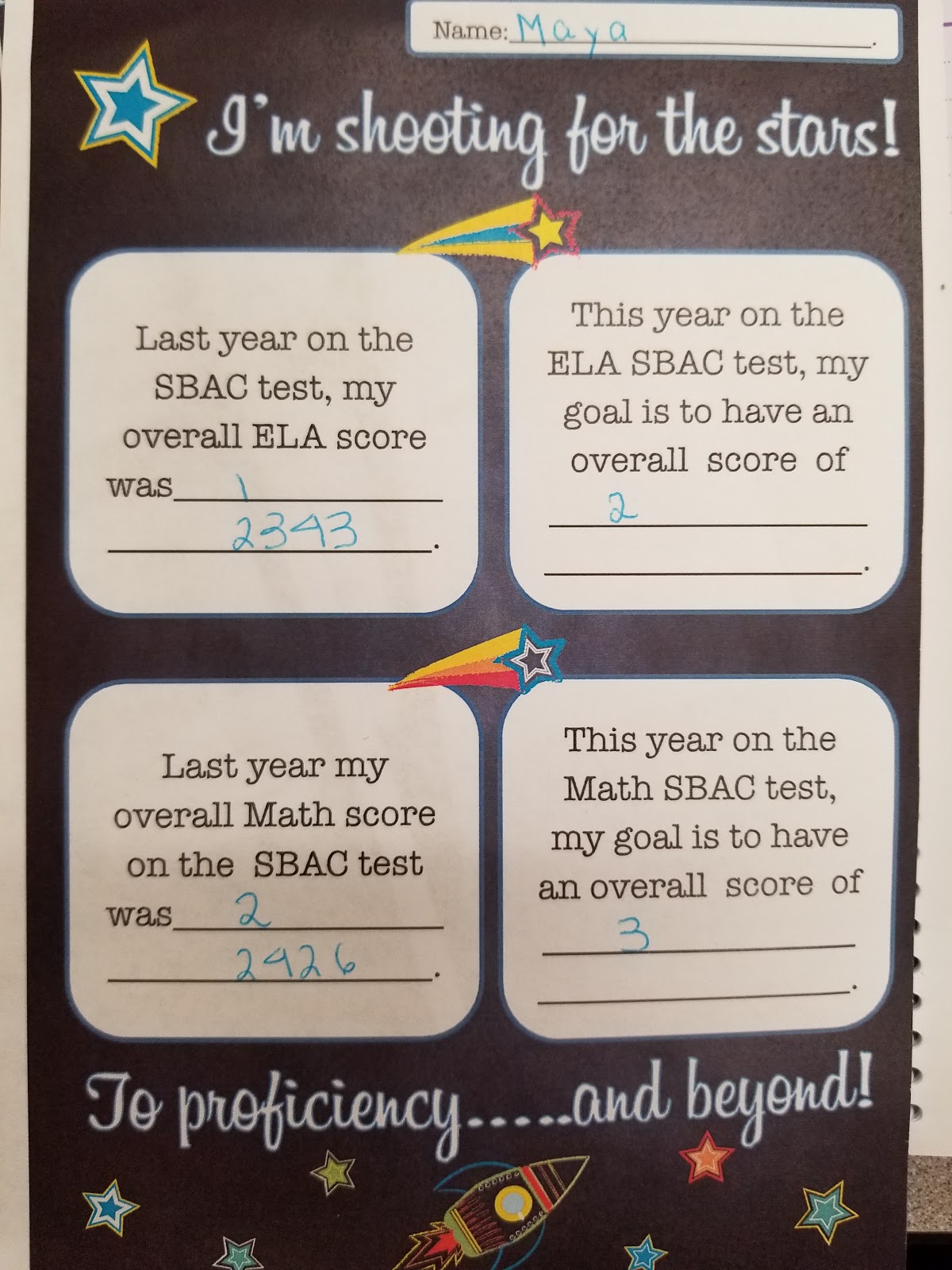
It’s extremely heartwarming to see the look on the kids faces and hear their excited conversations when they find out they have achieved a goal they set! In my classroom, I goal set with the kids prior to each SRI assessment, and prior to the district Math and ELA benchmarks.  It really is a powerful tool to help students focus on a specific skill, motivate them to learn, and helps them to feel accomplished when meeting their goals.  Those who don’t achieve their goals are generally further motivated to  work harder until they accomplish what they’d like to.  My school site additionally does goal setting with each student in grades 3-6 prior to SBAC testing as well (you can see an example of this below). It really does serve as a motivational tool and helps give them a purpose and something to really strive for. 


So how exactly can you implement goal setting? It’s easy! Here’s how you can get started:


1) Have frequent Growth Mindset conversations with your class.  Let me know that they CAN accomplish ANYTHING they set their mind to.  Let them know that you believe in them, and that you are here to help them accomplish their goals.  

2) Meet one-on-one with students prior to a test you would like to goal set for.  Show them their score on the last (similar) test, and then help them pick an attainable goal for the upcoming test.  Discuss specifically what they will need to do to achieve their goal, and what they might need from you to accomplish this goal.

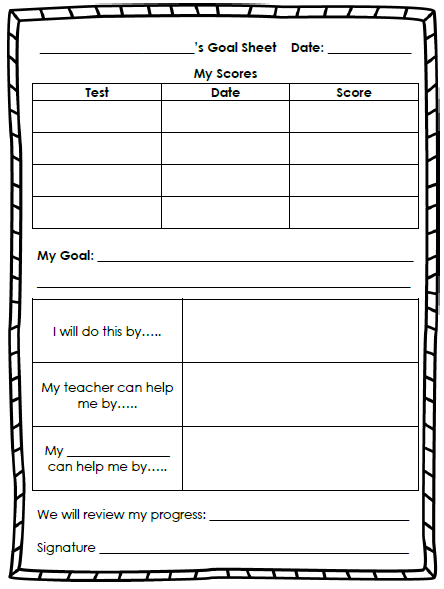
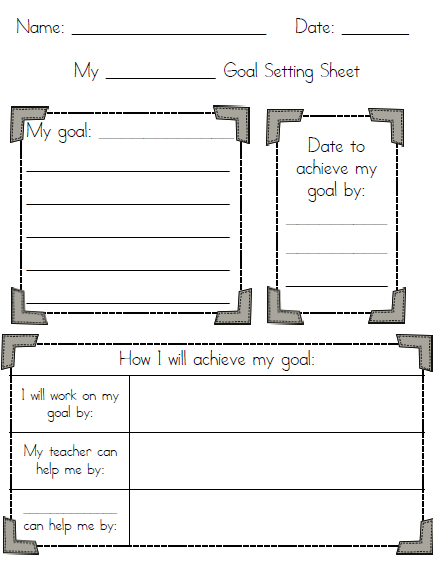
3) Provide them with some sort of paper that records their previous score (see examples above), and then add their current goal as you are discussing with them.  This can simply be done on a sticky note that they can just stick right on their desk and have as a constant reminder.  Or you can have them complete a more in-depth template where they might record their thoughts, ideas, etc. as in the examples above.  Either way is equally as powerful as long as the right conversations are being had!  

Collaboratively Learning,
Megan Brown

Copy of pic- Megan Brown.jpg
OMSD.jpg


Friday, May 1, 2020

Communicating with Parents and Students During the School Closure


During this time of school closures and distance learning, it's hard not to have that face to face communication with students and parents each day.  In my last blog I wrote about Zoom and Google Classroom and all the ways that I am using those communication tools. See my blog post here Distance Learning During a Pandemic

I thought I'd share about a couple other tools that I am using to communicate:

ClassTag

This is an app that is similar to ClassDojo.  I allows you to post announcements and include attachments, pictures, video, etc.  It looks a lot like how a Facebook newsfeed looks.  Parents can comment on or like your posts.  They can also private message you which looks the same as a text message.  You can also set up your parent conference schedule, and MANY MANY other things.  You can sign into their website on your computer and/or download the app to use on your phone.  I like the app because it sends you a notification anytime a parent comments or messages.

It also has a "library" tab where you can upload links or document or pictures that are important to keep them all in one place.  This way parents don't have to go searching for your original post with the link.  The nice part about this library tab is that it automatically saves any links you've posted in your announcements to the library.  So you don't need to do it twice!


Under the events tab is where you can schedule a variety of events include parent conferences.  You can organize parents volunteers, field trips and many other classroom events here.


One of the greatest features is that it translates all text English to Spanish and visa versa.  So if a parent leaves a comment or private messages me in Spanish, it translates it to English for me.  Likewise when I post or message in English, it will translate to Spanish for the parents who need it.  When you first set up the "Directory" you or the parents themselves setup their preferred language.  Definitely eliminates the issue of the language barrier!  Especially while were on Distance Learning working from home where we don't have quick access to translators.

Flipgrid

Another fun way to communicate with students in addition to Zoom and Google Classroom is an app called Flip Grid.  Flipgrid is a website that allows teachers to create "grids" to facilitate video discussions. Each grid is like a message board where teachers can pose questions, called "topics," and their students can post video responses that appear in a tiled grid display. Its super fun to use! Each grid can have multiple topics within it.  You can make the topics academic or just fun.  I am using flipgrid to support student's socio-emotional wellness and so I am just posting fun topics for them to respond to.  Such as "would you rather..." "Tell us a fun fact about yourself"... They like it and the videos have come out really cute.  You can create your own topics or chose from a library where tons are already made.

ClassTag and Flipgrid are just a couple of useful and fun ways to communicate with parents and students. Hope you found this useful!


Distantly Learning,
Megan Brown

Copy of pic- Megan Brown.jpg


Tuesday, March 16, 2021

How-To: A Quick Guide to Using Nearpod and Great Minds In-Sync (Eureka Math) Platforms

 I'm sure at this point, a year into the pandemic, you have watched a lot of "how-to" videos and learned many many different platforms.  I just thought I'd take a minute to share with you how I use the platforms Nearpod, and Great Minds In-Sync(Eureka Math) in my virtual classroom.  So this more of how I specifially use the platforms throughout my virtual instruction, and less of a how to get started type of a thing!

Nearpod

Nearpod is a digitial platfrom that allows you to make any of your lessons interactive.  You can use any lessons you have already created (ppt, google slides, word, even YouTube vids!) and make them interactive.  You can also create lessons through Nearpod.  It really increases student engagement, especially through the use of Collaborate boards, or the Draw It board feature (like a digital whiteboard).  

I create Collaborate boards across the curriculum.  I make them for Socio-Emotional Learning (morning circle discussions).  I make them for most componenets of a Eureka Math lesson: Application Problem, Student Debrief, and Exit Tickets.  I also create them for ELA to use with our Wonders curriculum for the "Making Connections" questions that are throughout the anthology stories.  I also create them with the vocab skills in mind, such as: similes, metaphors, greek roots etc.  

Additionally I often create a collaborate board for a digital version of the Kagan strategy, Jot Thoughts.  This is a strategy traditionally done in the classroom where kids work in table groups with sticky notes.  So instead, this is done with digital sticky notes on the collaborate board. Watch the video below to see a more detailed explanation of this strategy as well as examples of the above mentioned ways I use Nearpod.


Great Minds In-Sync (Eureka Math)
Great Minds is the parent company to Eureka Math.  They have created a full digital, interactive version of the Eureka Math Curriculum called "In-Sync."  This platform has been a life-saver as they have high quality engaging lesson videos.  These encompass the full concept development component of a Eureka math lesson.  Also, all student pages: Sprints, problem sets, succeed pages, etc are included as writeable PDFs, which make it really easy to use with google classroom.  Watch my video below where I talk more about how I specifically use the different features within the In-Sync site.

If you have ever considered using either of these platforms: Nearpod or In-Sync, but weren't really sure how exactly to implement in your virtual classroom, I hope this helped! Both of these platforms have been a life-saver for online learning and have really helped me boost engagment with my virtual lessons.

Virtually Learning,

Copy of pic- Megan Brown.jpg


Thursday, January 16, 2020

Building Background knowledge with Kagan


Building background knowledge is something we often skip over or forget about due to pacing and time constraints.  Often we want to just dive right into that days learning.  However, in an effort to both provide engagement on the new topic being learned, while also providing support for your English learners, it really is an important, yet simple step that we should take.

If you're looking for a cooperative learning structure to help you support building background knowledge when introducing a new topic, there are several Kagan structures you can use.  I am going to talk about just a couple of them here.  Like with all Kagan cooperative learning structures, these support learners at all academic levels, while also providing engagement, which research shows is key to student learning and success.


Three Step Interview
Image result for kagan three step interviewThis structure is super easy and fun to use during Day 1 of the ELA Wonders curriculum when you introduce the new Essential Question for that week. In our Wonders curriculum, on Day 1 of each week it has us "Introduce the concept."  This is  where you could easily take the essential question/concept and turn it into a question the students can relate to, and then implement this Three-Step Interview process.

 For instance, in Wonders 5th Grade Unit 3 Week 4 the Essential Question is, "What benefits come from people working as a group?"  You might then pose the question to the students, "Tell about a time where you succeeded at something when working together in a group."  You would pose the question, and either give students time to think, or have them quickly write their thoughts down.  Then proceed with the Three-Step interview process.  To summarize, Partner A would ask partner B the question and then visa versa.  They would then pair up with the other A/B pair at their table and go around the table sharing not their own thoughts, but rather their partners thoughts.  A very quick and easy way to get students engaged, talking, and sharing in groups!


Jot Thoughts

Image result for kagan jot thoughtsJot Thoughts is another fun Kagan structure than can be implemented in the beginning stages of building background knowledge of a topic or concept. Jot thoughts is a fun and  engaging way to have students brainstorm ideas about a topic.  For instance, in Wonders on Day 1 where you would introduce the topic, you always see the word web with a word (based on the essential question) in the middle.  It asks students to brainstorm words they know about that topic.  So in place of this, I will often use this Jot thoughts structure.  If we take the above mentioned essential question, the word provided in the word web for that week is "teamwork." So I will set a couple of decks of sticky notes on each table group and then ask them write down as many words, phrases, or ideas that come to mind when they think of "teamwork."  They are supposed to announce the word they're writing as they write it to prevent duplicate words.  You can then extend this Jot Thoughts activity into many other things.  For instance, once time is up, I will often times have the students work in their teams to categorize their words and develop names for the categories.  I then might ask them to do a free write about teamwork using as many of the word they can, etc.  It's fun, engaging, and gets students ready to learn more about the new concept that week.  Its also another opportunity to provide students with collaborative talk time, which supports ALL learners at ALL levels.

Additionally, this structure could also be used as a culminating activity at the end of the learning, to summarize what was learned about the topic!

Collaboratively Learning,
Megan Brown
Tuesday, October 29, 2019

Kagan "Rally Coach" Structure, Across Subjects


This structure empowers the students to be both the teacher and the learner.  When implemented correctly (see image above) this structure is very effective in putting the learning into the hands of the students.  Watching them listen to and learn from one another, while catching and fixing their own mistakes is a very rewarding experience to watch as a teacher.

Furthermore, this simple structure helps strengthen students' reasoning skills.  When this structure is implemented regularly, students get to practice explaining what and how they did something.  This in turn, supports practicing their reasoning skills and in a verbal context, which a great support for all learners but especially our EL's.


I use this strategy with Eureka Math almost every day during the Application Problem or even some of the concept development problems.  I've also had students utilize this strategy for certain problems in the problem set.  I also tell the students that when it's their turn to be the "coach" or the "teacher" that they need to pretend they are explaining this concept to a younger student who hasn't yet learned how to do this.  This helps them gain a better understanding of making sure they explain every detail.  I circulate and listen, and will support as needed.

In ELA, I use this process a lot when we do RACES writing.   I will have students Rally Coach their C (cite text evidence) and E (explain) components.  The E (Explain) part of RACES is particularly difficult for students.  This is where they "explain" how their text evidence supports the answer they previously stated.  Having them partner up and use Rally Coach helps give them support with the explaining piece.  Their partner is required to listen and give feedback after the "coach" is done explaining what they came up with.  I have found that implementing this Rally Coach structure during writing, has really strengthened peer editing.  My students really do listen to one another and help their peers to strengthen their work! I monitor and provide assistance when I deem necessary. 

Collaboratively Learning,
Megan Brown
Copy of pic- Megan Brown.jpg


Tuesday, August 24, 2021

Growth Mindset: Successful Students with Jot Thoughts


During the first few weeks back to school, it's so important to build a sense of community and belonging amongst your students.  You want them to feel that your classrom is a safe place to learn and share.  Through all the team building and classroom building activities that I engage my students in the first few weeks, I think it's equally important to place an emphasis on Growth Mindset.  We know that your mindset can change or determine your outcome and success, and that's so very true for our students as well!

Being as though we are an AVID school for many years now, one of the first activities we do at the start of the year is something called the "Successful Student." For this activity, students will brainstorm words that show what it means to be a successful student.  I copy the outline of a person onto cardstock and here they decorate the person to look like themselves and fill the poster with words that describe being a successful student.


I incorporated Growth Mindset into this activity by asing them to think of things they feel they're not good at "yet" or things they want to become better at as a studnet this year.


I used a collaboratve learning Kagan strategy called "Jot Thoughts" to help guide and facilitate discussions about growth mindset and what it means to be a successful student.  You can see the pictures I've included of this Jot Thoughts strategy as my students engaging in these discussions the first week of school!  You can also see the photos of the finished product of the "Successful Students."

This "Successful Student" activity is just one example of a very simple way to use collaborate learning (Kagan- Jot Thoughts), and Growth Mindset to help students engage in positive thinking. It's also a super fun activity, helps them to learn how to work together, and not to mention they look super cute up on the wall!

Collaboratively Learning,

Copy of pic- Megan Brown.jpg

Tuesday, December 10, 2019

Collaborative Conversations with Kagan

Collaborative conversations when done though the proper cooperative learning structures (aka Kagan), can be soooo incredibly powerful for student learning! Powerful AND engaging! My students absolutely love doing collaborative discussions. And you may be thinking, "How is this effective? How is letting the kids talk in groups not a waste of time?" Well I'm gonna show you just how effective it is!

To start, you want to make sure you've constructed appropriate collaborative learning groups.  Meaning you want to have an even mix of High, Low, Medium, GATE, EL, EO students, etc.  This keeps the groups well balanced and supports differentiation of instruction for students at all levels.  They are all able to contribute and learn at their own level, while accessing the same content classroom wide.  This is very important to maximize learning. (To learn more about Cooperative Learning structures, see my previous blog posts here: Cooperative Learning Structures  and also here: More on Cooperative Learning Structures/Kagan)

Once you've  created these evenly balanced groups, you want facilitate team building activities.  These are non-academic activities that help students to get to know each other, and to understand the importance of working together as a team, establishing each of their strength's etc.  These activities could be something like building something, creating something, building words out of letters, etc.  This piece is extremely important to help foster student's sense of belonging, and comfort-ability working with each other.  If you skip this essential step, you will probably not get full participation from ALL of your students within their table groups. (see my previous blog for more info in Team Building here: Team Building with Kagan)

Now you're ready to start collaborative, higher level academic discussions! I also teach the students "accountable talk" sentence frames, so that they know how to have a discussion.  Often times I use the Essential Question from the Wonders ELA curriculum that week as the focus point of the discussion, as well as the reading comprehension skills taught that week.  Or, I have students annotate the text before the discussion and have them use their annotations to guide their discussions.  Often times, I will incorporate all of the above into one lesson/discussion.  I also use the Kagan Software with the random selector tools, to choose students at random to share out after each discussion any random selector software, or even just equity sticks will work!).  The students are taught that they can share their idea or one discussed at their table.  I find that my students are VERY  excited to share their peers' ideas just as much as they are their own.  Through establishing these cooperative learning groups and academic talk, my students are VERY VERY good at complimenting each other, giving each other positive feedback, helping out their peers when in need.  Its really endearing and super cute to watch them.

I  have seen my students year after year, make huge gains and growth in their reading comprehension skills as well as test scores.  Structuring these academic discussions in the correct manner helps facilitate students reading, writing, and research skills, in addition to helping strengthen their speaking and listening skills.  These types of discussions also help students develop a strong understanding of being able to site the text in order to support an original thought or idea of their own.  I encourage you to start using these collaborative discussions in your classroom right away! 

Collaboratively Learning,
Megan Brown
Copy of pic- Megan Brown.jpg

Monday, December 17, 2018

Full STEAM Ahead!


STEAM is an educational approach to learning that uses Science, Technology, Engineering, the Arts and Mathematics as access points for guiding student inquiry, dialogue, and critical thinking. The end results are students who take thoughtful risks, engage in experiential learning, persist in problem-solving, embrace collaboration, and work through the creative process. These are the innovators, educators, leaders, and learners of the 21st century!


We focused on a STEAM activity in December where the students had to work collaboratively in groups to construct the tallest standing structure (Christmas tree), using only gum drops and toothpicks.  Not only is the activity hands on and interactive, it requires the students to think critically, use the strengths of their combined teamwork, and allows the students' creativity to shine!


The process I followed for this particular activity:
1) Gave students handouts which discussed their mission/assignment.
2)  The handouts also included an organizer for students to write down their thinking, and come up with a plan as a group as to how they will be able to build it successfully.
3) Supplies are then distributed and students work in groups to build.  
4) After giving the kids about 30 min or so to build their structure, we then stopped and checked out each group's work.  Groups share out to discuss what they discovered and what they noticed did/ didn't work.
5) Now students use Chromebooks to actually research how to build successful structures (such as having a strong supportive base, etc).
6) After we have discussed and they have researched the topic they are then allowed to rebuild with their group.  
7) The activity is closed by debriefing again with students to discuss, how it was different/ better the second time they built it, what they learned about building structures, and how working in a team was valuable.

I truly believe its such an invaluable skill to teach our students how to collaborative and work/think together.  My students work so well together and have learned each other's strengths and how to utilize them in a project. I have watched my students flourish and learn so much this year thorough the power of collaboration.  STEAM activities are a GREAT way to incorporate these skills into your classroom!

Collaboratively Learning,
Megan Brown

Copy of pic- Megan Brown.jpg


Most Viewed Posts