Showing posts with label Eureka Math. Show all posts

Tuesday, December 28, 2021

Digital Learning Log - A Weekly Reflection


Each summer I come up with ideas of what I want to try in my classroom - some come to fruition and some do not.  One of the things I have wanted my students to do is to reflect on their work - but this reflection time just never seemed to make it into my classroom routine.  I finally decided that I must commit to giving my students time in class to do this and to, better yet, give them a template.

So, I committed to every Friday giving students time in class to reflect on their weekly work.  In addition, I found a digital notebook that students use (see below).

To date, this deliberate instructional decision has been really positive - from both a student viewpoint and a teacher viewpoint.  For students, this time allows them to take a deep breath, look a their math work for the week, and make some written statements.  For me, I now must deliberately allow students 15 minutes on Friday to complete their weekly learning log.

Another benefit that I have reaped from this instructional decision each week is that I learn even more about my students - both mathematically and personally.  Yes - personally as well.  I intentionally ask a question each week that asks students to tell me what they are planning on doing during the weekend.  I have learned so many new things about my students with this simple question - from students going to sporting tournaments to visiting family in Los Angeles to students riding a bull - it is all so great when the following week I can ask students specific questions about their weekend.  Just another attempt to make connections with my students throughout the year.

A few student samples:


Natalie - Period 1


Cristina - Period 2 (Newcomer Student)


Here is the original Digital Learning Log that I then modified for my classes during the first semester (sorry, I found it through my many Google searches and cannot find the original source at this time - I do know that it was free and when I find the source will update this blog to give credit to the originally creator.)

Original Digital Learning Log

I took this resource and modified it so that it looks like this now:

My Version of the Digital Learning Log

Students created a copy of my Digital Learning Log and linked it to my original copy so that when I made any changes then their copy also got the changes - big shout out to Ms. Mary-Elizabeth Quan for sharing this skill during a Coaching Collaborative Meeting earlier this school year!  Note:  if you would like to learn this valuable skill, then here is a short 5 minute video that she put together:

Digital Notebook Linking by Ms. Mary-Elizabeth Quan


My plan is to continue this practice during the second semester - as I find value in this practice from having students reflect on their work to learning more about my students on a personal level (in a low risk activity).  My hope is that students will value this experience as the year progresses and be able to take what they learn from it and apply it to their studies next year in high school.


Please reach out if you have any questions or want to come and observe my classroom.


Give yourself grace during these difficult times and when you have then give yourself more grace.


Teaching and still loving it,

Kevin Stott                         

De Anza Middle School    

Math 8 & Integrated Math I
Saturday, November 27, 2021

Common Core and Math: Running to the Win with RUNNS

 By Heather Pfrunder, M.A.Ed          SDC Teacher and Education Specialist

November 27, 2021


I can attribute my learned affection for math to the teaching formula of Eureka math: concrete objects, visual models, then representative diagrams.  Somehow in the vertical alignment of visual aids, math ceased to be a rote memorization of steps and procedures to fun puzzles to be solved.  However, I quickly found that beyond the steps of number sense for my students 100% of them stumbled to understand what to do once it came time to apply the concepts in real-world scenarios (i.e. word problems).  We would go confidently from adding using 1:1 correspondence and manipulatives, to count-on strategies, to simple algorithms, and then crash into a halted stop once it came time to apply them.  Logically, the Read, Draw, Write of what we had been doing all along should have worked - but it didn’t.  We would pull out the Eureka Math workbooks and would never get past guided practice: doe-eyed, my students would wait for me to explain the vocabulary, where to find it, and what to do with it.  I was waiting for the flicker of recognition, a spark of partial understanding that would never come - or at least never come until I adjusted my strategies. Thus it came to be, I, the lover of the written word, came to research and write my Master’s Thesis on my lesser love: Math.  


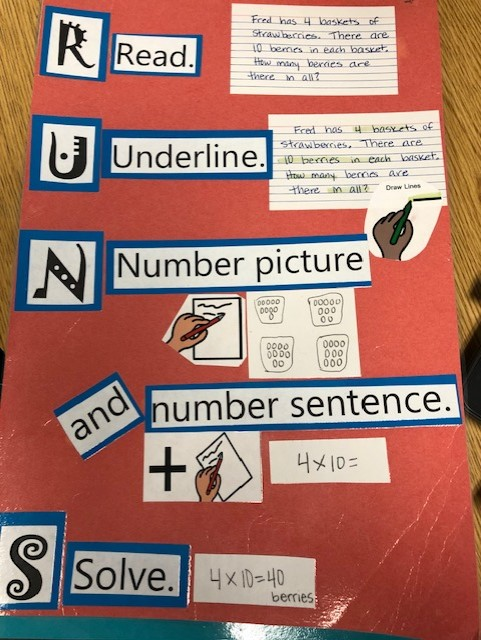
What I learned was a strategy to address the specific challenge of many of our students with language delays.  It is also the challenge that faces many of our English Language Learners.  The beautiful thing about this strategy is that it nestles quite nicely within the framework of Read, Draw, Write.  By using schema-based instruction (instruction to develop metacognition for the development of problem-solving skills through the use of mnemonics and/or visual aids/charts), my students were able to have real and lasting results.  Enter the development of my RUNNS strategy: Read, Underline, Number picture, Number sentence, Solve. While I can’t lay claim to the original idea by Rockwell, Griffin, and Jones (“RUNS… (1) Read the problem, (2) Use a diagram, (3) Number sentence, and (4) State the answer” (p. 90) , I can say that via formative assessments I found my adjustment to be far more effective with my students. 

Here is how:


 While the acronym may seem pretty self-explanatory,  

there are a few tricks to it that really make it work.


R - Read Read as in 1st read in its entirety and a 2nd read for specific chunking of info/close reading.


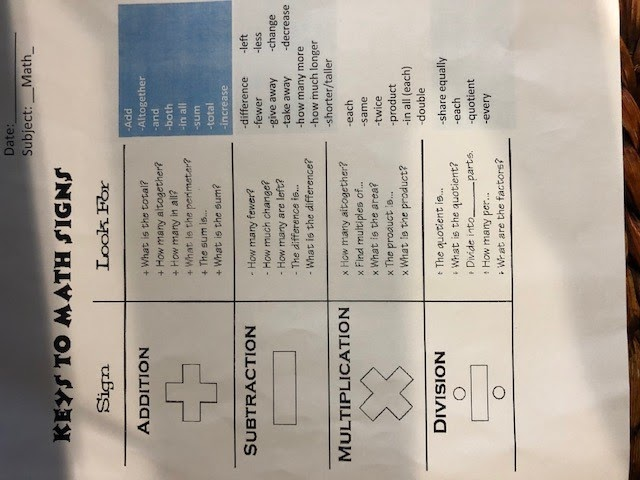
U - Underline.  Underline numbers and “special words” (i.e. "fewer, more than, each, groups, ect…") And most importantly, underline “the ASK.”  What is the question?  What are the key words there?  To know what to underline is the trick to this step.  For this I use AVID column notes for students to reference.  They find the “math words” then match them to their chart with a dry-erase marker.  By doing so, they are able to identify the function.  


While the original note/visual was shared with me from another teacher,

I found that I needed to add more to it to be reflective of

the Eureka Math questions - thus the unofficial 3rd column.


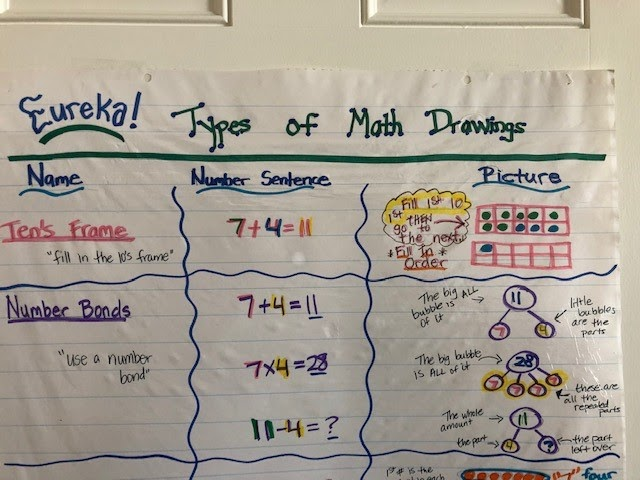
N - Number Picture.  For this I usually like to set up expectations.  It takes a while for my students to remember just what is a number bond, a tape diagram, or an array.  Knowing which picture to use can be even more challenging.  Typically, Eureka Math highlights a specific pictorial strategy in the lesson set.  Front loading students to understand the expectation is key in helping struggling and/or unique learners.


In this anchor chart I even gave examples of the Eureka Math verbiage for my 

students that require more direct examples.


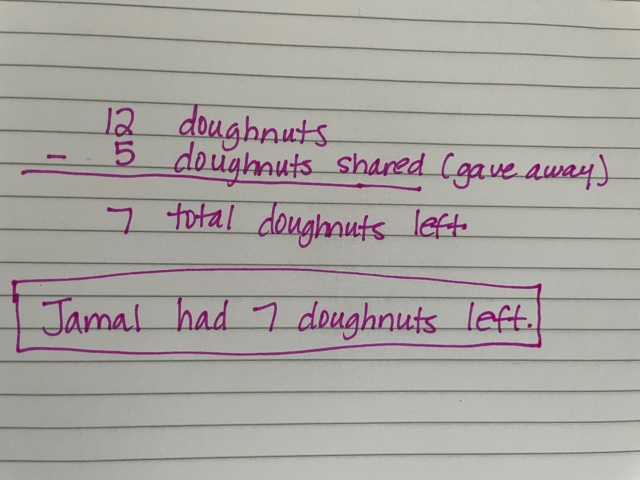
N- Number Sentence.  Here we put it into place: what quantities (or use simplified verbiage to restate vocabulary “numbers”) what function do we put into place.  Tip: Vertically align the number sentence and label.  This makes the last step so much easier and keeps the train of thought connected to the word problem looking to be solved.


Numbers with their labels to make a vertical number sentence.


S - Solve. For this we double check, “Did we answer the ‘ASK’?”  This means making sure we have the written label.  I like to have students box their final answer - especially if there is a lot of work on the page.


And Solved it!  The answer is in a full sentence and boxed.


Whether you are struggling with a unique learner or trying to overcome sluggish student progress, this may be the solution.  Through the RUNNS strategy multiple challenges are addressed: breaking down of the “ASK” to solve, identifying key math vocabulary and their meaning, recognizing types of visuals, and putting it all together.  Like all good visual strategies, over time they needed to be faded back.  The beauty of this math strategy is that with repeated practice, students should be able to recall the specific strategy long after their graphic organizers are tucked away.  I’d love to hear if you are running to win with RUNNS!  


Common Core RUNNS Resource: Common Core Math Tools


Like what you read? Join me in upcoming blog posts where I continue to put these strategies into place and share resources!


Rockwell, S., Griffin, C., & Jones, H. (2001). Schema-based strategy instruction in mathematics and the word problem-solving performance of a student with autism. Focus on autism and other developmental disabilities. 26(2) 87-95. Doi: 10.1177/1088357611405039.

Sunday, November 14, 2021

Making Eureka Math More Engaging - Loop Activity


Does this sound familiar - take out your Eureka math workbook, turn to page 70 and work exercise problems 1 - 6?

Do you cringe when you look at the Eureka math workbook and note that it is not very student friendly - especially for our struggling math students?

Do you wish that you had more time to take a Eureka Math lesson and make it more engaging?


Heck, I have at some point over the past several years said yes to these questions and many more like them.  To combat these yes answers I try to employ different strategies and activities over the years to fill my teacher 'toolkit belt' with resources that can be meaningful and relevant for my students.  One age old adage I have tried to embrace this year is that 'Variety is the Spice of Life.'  Routines and procedures in the classroom create a safe environment for students - but who does not enjoy a surprise activity every once in awhile that shakes things up a bit.


Here is a recent activity I did with my math classes by taking Eureka exercise problems and putting them into a Loop Activity (this activity has also been called "I have, Who has" - Math Treasure Hunts, etc.)  I took each exercise problem and put it on a sheet of paper with the answer from a different problem at the top of the paper.  For this activity, I took 8 problems with their answers to create my Loop Activity.  The idea of the Loop Activity is that you work out the problem to find the answer and then find the answer on another sheet of paper.  You then work out the problem on that sheet of paper and find the answer on another sheet of paper.  The last problem's answer should then take you back to the answer on the first sheet of paper - which closes the Loop Activity.  Below is a link to the Google Slides Template that I use to create my Loop Activities - feel free to make a copy and edit the text with your problems/answers.


I put my students in groups to do this activity and I made two copies of the Loop Activity so that I could split my classroom in half to assist with student management.  I placed one page on each desk and had each group of students choose a desk to start at - in a Loop Activity it does not matter where you start.  

I noticed that during the activity students were engaged in solving the problems, helping each other, talking about math, and showing their work on a paper I provided to them.  Students were unaware of what I was doing - which was listening to conversations take place.  I noticed that at the end of the time allotted for the activity students had been successfully engaged in doing their math exercise problems while not thinking that they were actually doing math as usual.  I heard students say that it was fun, can we do this again, we need more time because we got stuck on a problem - all music to my ears that today was engaging and meaningful for my students.


"Variety is the Spice of Life" - do I do this specific activity a lot?  No.  This is just one activity in my
teacher toolkit.  I also use 'Level Ups' which take the Eureka math questions from an entire unit of study and build a pyramid with them so that the easier questions are at the bottom and gradually get more difficult until reaching the top of the pyramid with the most difficult question (Shout out to Ms. Keeton for these awesome engaging activities).  Mrs. Nelson (Spotlight Teacher), at my site, just shared with me about an idea called, "Math Cake Walk" - where students solve a problem, walk around a circle of numbers until the music stops, a number is randomly called and if the student on that number has the correct answer then they win.  My goal is to create such an activity around my current unit of study on system of equations to get students doing math problems with a slight twist to engage them.  


I encourage you to look at Eureka Math and ask yourself how can I make this engaging for students in a different and meaningful way?  I encourage you to work with colleagues in designing one activity that you can use this year and again next year.  I encourage you to slowly build your teacher toolkit with engaging activities so that after a few years you start to have a library of activities that you can use with your students.  I get that Eureka Math can be challenging in its presentation to students and I get that time is not a luxury we have - so start small otherwise it can be so overwhelming.


Please feel free to reach out with any questions as we continue to look for ways to engage our students during another year of a pandemic that impacts each and everyone of us on a daily basis.


Most importantly, give yourself grace and when you have done that then give yourself even more grace.


Teaching and still loving it,

Kevin Stott                         

De Anza Middle School    


Monday, September 20, 2021

Gradual Release with Eureka Math


My Math Wall

Musings

Please indulge me for a moment (if you don’t want to that’s fine, scroll to the next heading 🙂


I just finished a book in which the main character is hit by a car and needs to relearn how to walk. When the doctor checks on her, the doctor says the following


“This is a long road ahead. It’s one that can be very frustrating. It will only get more frustrating. You’re going to have to learn how to do something you already know how to do. You will get angry. You will feel like giving up. I just want you to know that it’s okay to want to give up. That it’s okay to reach a breaking point with this stuff. You have to have patience with yourself”


I feel like this year more than ever I need the reminder that it’s okay to be frustrated and feel like I’m at a breaking point. I’m human and this teaching stuff is hard. What I’ve been working on is having patience with myself and accepting the fact that this feels like I’m relearning things I used to know how to do! Case in point: Eureka Math


EUREKA! I don’t get it...


I’ve been using Eureka Math for four years, which is to say that I’ve been struggling with Eureka Math for four years. I’ve been to the amazing district Eureka Preparation and Customization PD on how to teach the lessons, I’ve watched the Eureka provided PD on it, and I’ve read more blogs than I care to count, but I’ve never been able to hit my stride and make all the pieces fit.


This year, math needs to be a special priority because over 100% of my class is below grade level in math. In my quest to learn more about MTSS and being deliberate about gradual release, I’m happy to say that I think I juuuuuust might have figured it out for myself.


Gradual Release with Eureka: Ruth’s Way!


Fluency - 5 minutes

Skip counting by 3, 4, 6, 7, 8, and 9. I used the linked videos for kids to practice skip counting. I don’t do all of them every day, but I make sure to hit every one at least once a week.


Gradual Release - 50 minutes


I DO - 15 minutes


Introduce the learning target, link it to their prior knowledge, explain the importance of the skill in real life, explain success criteria.


One of the parts of Eureka that I’ve found most challenging is that the direct instruction isn’t presented in the same way as the Problem Set and Exit Ticket. That’s led to a lot of confusion for my students about how to apply the new knowledge they’ve gained in the lesson to a novel situation.


To address that, I use the Succeed homework book to teach the concept. Each lesson has 3-4 problems that are presented exactly like those of the Problem Set and Exit Ticket. That way, students are seeing problems that are like the ones they will need to solve. 


I model the first problem step by step specifically explaining how to do each step of the problem. I then ask for up to 3 risk-takers to share what they don’t understand yet. I go through another problem specifically pointing out the answers to their questions. I ask for 3 more courageous students to share what they don’t understand yet and go back to the problem to show them how I came to that answer. I’ve found that asking students to specifically state what they don’t understand is really helpful in getting me to hone in on a particular step and also encourages students to be reflective and actively engaged in the learning process.


WE DO - 25 minutes


I dismiss the whole table of students (balanced through Kagan groupings based on the iReady diagnostic) to work with each other around the classroom on the problem set. The kids love this flexible seating option and I’ve noticed they really stay on track when they can be in a different environment for collaborative work time. Students use Math Talk sentence stems in their communication with one another. I encourage them to use the anchor chart if they are stuck and I use it as a teaching tool as I walk around to groups and guide them as needed.


After 20 minutes, I call students back to their desks and we debrief the problem set. I will either call on students to be the “tiny teacher” and explain their solution or I will clear up a common misconception I noticed while circulating. This is another key moment to have students reflect on their learning and ask for any last-minute guidance.


YOU DO - 20 minutes


Students complete the Exit Ticket independently. When they are done, they bring me the Exit Ticket and I give them instant feedback. They either get a check that it’s correct and then go to Xtra Math (more on that in a minute) or are given corrective feedback that they then apply to their Exit Ticket and they bring it back to me in the “Fast Lane” which is a line that forms at a different part of my desk and helps them move through faster.


Once they have a check, they log on to their Chromebook and go to Xtra Math. Look, I tried using the Eureka Sprints, but I could never get into a groove of giving kids feedback on them so I would have some kids who only finished two correctly and some who wrote “15” for every answer on the page and felt like they were really successful for finishing the whole thing. All that is to say that fact fluency wasn’t getting addressed in my class. In my search to rectify this, I found Xtra Math. It gives you good reports and each session is about 7-10 minutes long. It can also be linked to your Clever page for easy access (see how here). Students take a placement test and then practice only the basic facts that they don’t know. Once they show mastery of a certain operation, they move to the next one.


If a lesson has been successful, MOST of my students complete the Exit Ticket correctly within about 10 minutes. If I have a group that is struggling, I can then pull them and do a reteach while the rest of my class is on Xtra Math. Once they finish a session, they know to go to iReady Math.


DEBRIEF - 5 minutes


Students are given the signal to remove their headphones. We discuss successes and challenges of the lesson. We revisit the learning target to determine if it has been met and I then tell them how we will use this new learning to help us on our quest for math knowledge the next day.


Wrap Up


After years of struggling, I’ve finally found a way to make this powerful curriculum work for me. Students have already been very successful in meeting learning targets (I’m talking 90% of my class is correct on their Exit Ticket) and for the first time ever, I look forward to math because I feel like my daily instruction is truly best, first instruction.


We’re relearning things we already knew how to do and it’s okay to get to a breaking point. Have patience and be gentle to yourself. Always remember,


TPT links to similar resources: Math Talk Key Words  CUBES


Here for you,

Ruth Reinkymov

3rd Grade Teacher

Hawthorne IB World School


Tuesday, March 16, 2021

How-To: A Quick Guide to Using Nearpod and Great Minds In-Sync (Eureka Math) Platforms

 I'm sure at this point, a year into the pandemic, you have watched a lot of "how-to" videos and learned many many different platforms.  I just thought I'd take a minute to share with you how I use the platforms Nearpod, and Great Minds In-Sync(Eureka Math) in my virtual classroom.  So this more of how I specifially use the platforms throughout my virtual instruction, and less of a how to get started type of a thing!

Nearpod

Nearpod is a digitial platfrom that allows you to make any of your lessons interactive.  You can use any lessons you have already created (ppt, google slides, word, even YouTube vids!) and make them interactive.  You can also create lessons through Nearpod.  It really increases student engagement, especially through the use of Collaborate boards, or the Draw It board feature (like a digital whiteboard).  

I create Collaborate boards across the curriculum.  I make them for Socio-Emotional Learning (morning circle discussions).  I make them for most componenets of a Eureka Math lesson: Application Problem, Student Debrief, and Exit Tickets.  I also create them for ELA to use with our Wonders curriculum for the "Making Connections" questions that are throughout the anthology stories.  I also create them with the vocab skills in mind, such as: similes, metaphors, greek roots etc.  

Additionally I often create a collaborate board for a digital version of the Kagan strategy, Jot Thoughts.  This is a strategy traditionally done in the classroom where kids work in table groups with sticky notes.  So instead, this is done with digital sticky notes on the collaborate board. Watch the video below to see a more detailed explanation of this strategy as well as examples of the above mentioned ways I use Nearpod.


Great Minds In-Sync (Eureka Math)
Great Minds is the parent company to Eureka Math.  They have created a full digital, interactive version of the Eureka Math Curriculum called "In-Sync."  This platform has been a life-saver as they have high quality engaging lesson videos.  These encompass the full concept development component of a Eureka math lesson.  Also, all student pages: Sprints, problem sets, succeed pages, etc are included as writeable PDFs, which make it really easy to use with google classroom.  Watch my video below where I talk more about how I specifically use the different features within the In-Sync site.

If you have ever considered using either of these platforms: Nearpod or In-Sync, but weren't really sure how exactly to implement in your virtual classroom, I hope this helped! Both of these platforms have been a life-saver for online learning and have really helped me boost engagment with my virtual lessons.

Virtually Learning,

Copy of pic- Megan Brown.jpg


Tuesday, December 15, 2020

Virtual Sprint Routine with Eureka Math

 If you're familiar with the Sprint Routine in the Eureka Math curriculum, then you know how valuable it is in supporting students' fact fluency.  Not to mention, that it's such an upbeat fun activity the kids truly love them.  Unfortunately, as with many other things in online learning, it's difficult to do with the same effect and energy.  

I work as a seasonal associate for Great Minds (parent company of Eureka Math) over the summers, and had the privilege of learnng how to deliver a sprint routine virtually.  I have since adapted and taught it to my kids this year and I truly think its alllllmost as fun as it is in the classroom! So if this is a key piece you've been missing from your Eureka Math lessons, I hope this helps!

The routine as follows:

1.  Have the students open their Sprint book to the desired lesson, Sprint A. You will explain to them that they must work down the columns and not skip around.  They are only to do the very best they can  in the 60 seconds and they are NOT intended to finish the sprint. Make sure they understand the directions for that particular sprint. (I usually display mine either under the doc cam or digitally by sharing my screen to ensure they are all on the right page)

2.  Ensure all their cameras are turned on and they are ready.  Ask them to hold their pencils in the air until you see everyone has done so.  Set the timer for 60 seconds and say "ready, set, go!"

3.  When the timer goes off I say "drop your pencil and put your hands in the air!" I'll quickly scan and call out the names of kiddos who hands aren't in the air.

4.  Then I'll ask them the draw a line under the last problem they completed and get ready to check their answers. When I go over the directions for how we will check them I say, "If you answered the problem and got it correct, chant 'YES!' and put a check mark next to that problem.  If you answered it but got it wrong, then silently circle it.  Here's the important part: As I'm calling out the answers, once you get to the one you LAST completed, turn your camera off."  Then you want to quickly and engergetically read off the answers.  I stop about every 10 or so remind them to turn their camera off once they get past the last problem they've completed.  Once all cameras are off, you can stop reading the answers.

5. Next I have them count their total # correct (subtracting any they got wrong ) and send it to me privately in the chat (they can send it private or public whatever they're comfortable with).  I watch their responses and then call out the student who answered the most correct and we then decide on a cheer to give that student. (e.g. cheese grater cheer, chili pepper cheer, truck driver cheer, etc.)

6.  I toggle back to the view of the sprint and facilitate a discussion analyzing the sprint.  I will point out a few patterns and then ask the kids to type into the chat "what patterns do you see?" "What parts were hard or easy?" "Which parts slowed you down?" etc.  Then after the dicussion (just a couple of minutes), I give them about 30 seconds more to continue practicing where they left off on the sprint.

7.  After that we take a quick movement break.  We will to 2 movement skip counting exercises, the first one fast-paced, the second one slow.  For instance, the first one you can have the kids skip count by 2's up to 20 and back down while moving their arms quickly like windshield wipers.  For the second exercise, skip counting by 3s up to 30 to the movement of slow shoulder rolls (see my video below).  The purpose of this is get them moving and also get their brains warmed up with the skip counting.

8. Now the kiddos are ready to complete part B of the sprint.  You will tell them that their ONLY goal is to simply get just ONE more correct than they did on side A.  Again the goal is not to complete the sprint. Have them turn to side B and again put their pencils in the air.  Once you see everyone ready, say "ready, set, go!" and start the timer for 60 seconds. When the timer goes off instuct them to put their pencils down and hands in the air.  Then repeat step #4 from above.

9. THIS TIME however, after they calculate their total # correct, they do not send it to you in the chat.  This time they will calculate their improvement score from side A to Side B.  Meaning how many more correct did they get on side B.  Then they send you that # via the chat (either public or private).  This time we celebrate the student who had the most improvement and we again choose a cheer for that student.  I will sometimes also celebrate if a student completed the sprint, or even sometimes I choose the students with the top 3 improvement scores.  The cheers are the best part- the kids love them! (see my previous blog post on cheers).

Below is a video of my students conducting this virtual sprint routine.  By NO MEANS is it perfect.. lol.. but hopefully it will give you a good idea of how you can also implement this into your virtual classroom!

CLICK HERE to see a virtual sprint routine lesson in my classroom!

Virtually Learning,


Friday, October 9, 2020

Using Nearpod for Collaborative Learning

I am sure you have heard about Nearpod and seen it on the district website of online learning resources, alongside many others.  I know that there are sooo many resources our district has graciously purchased or shared with us to support us in our online learning.  So I am going to spend some time just talking about ONE aspect of Nearpod here today. 

First off, what is NearpodNearpod helps educators make any lesson interactive whether in the classroom or virtual. The concept is simple. A teacher can create interactive presentations that can contain Quiz's, Polls, Videos, Collaborate Boards, and more.

In this blog, I am only going to be talking about how to use the Nearpod Collaborate Board as a collaborative learning tool.  I think the biggest part of online learning that's killng me (and the kids) is that they're missing the student interaction and collaborative learning structures that we use so routinely in the classroom. If you've been through Kagan training and implemented those collaborative learning structures in you classroom before, you know the power behind them and how positively they effect student learning, growth, and confidence.

"Collaborate! is a Nearpod feature that allows you to set up an interactive board for brainstorming, sharing text and images. You add the boards, students simply add their ideas. You can moderate these boards from your Teacher Dashboard, reordering them and sharing them." CLICK HERE to learn more about his feature.

Ways I use the Nearpod Collaborate Board in my 5th Grade Classroom:

1)  ELA Wonders Curriculum: I use this feature in many ways throughout the Wonders curriculum.  I use it with the Day 1 introduce the concept question that is in the Reading Writing Workshop book.  I also use it at the end of the week with the essential question to help them brainstorm ideas before they start their RACES writing.  I also use it with the Making Connections questions that are throughout the student stories in their text books (you can see this below).


2) Community Circle Discussion Questions: I also setup Nearpod with our community circle question.  We start our day with a community circle question each morning, and most days we do it on Nearpod.  I read their posts aloud as they post them.  I then ask if anyone wants to share their thoughts outloud.  This way, every child is held accountable to responding, but for those super shy introverrted kiddos they're not forced to share out loud if they feel uncomfortable


3)Eureka Math Student Debrief: Often times I pick one of the student debrief questions and have them do it on the Nearpod collaborative board as you can see here. This is from the 5th Grade Eureka Math Module 1 Lesson 14 student debrief. It's really amazing to see all the connections they're making in math.  If I didn't provide them this opportunity to share with each other, they'd be missing out on this really powerful component of a Eureka Math lesson. 

So if you've been searching for a way to bring that collaboration piece back into your virtual online classroom, I hope this helps!!


Virtually Learning,


Most Viewed Posts