Showing posts with label distance learning. Show all posts

Friday, March 12, 2021

How to Hold Students Accountable with Jamboard


Out of all the new tools I've tried this school year, Jamboard is my favorite! I love how easy it is to create, share with students, and collaborate with this tech tool. My students also loved to use it for brainstorming within their groups and with the whole class. The more I used it (like most things), the easier it was to use. The only negative I found to Jamboard was I could not easily keep track of which students were actively engaged in the learning and which students were not. 


I tried to keep track by crossing off my students' names on the rosters or just getting a total count, but I still found it difficult to hold students accountable and to check for understanding. Those two things are what I've struggled with most during distance learning, so when this new tech tool didn't work the way I needed it to, I became frustrated. Then, the Jamboard gods answered my prayers and let the user upload a background. This was a GAME CHANGER!


With the ability to create or upload your own background, you can make interactive templates to suit your instructional needs.


Here is what I started doing for accountability and checking for understanding: 


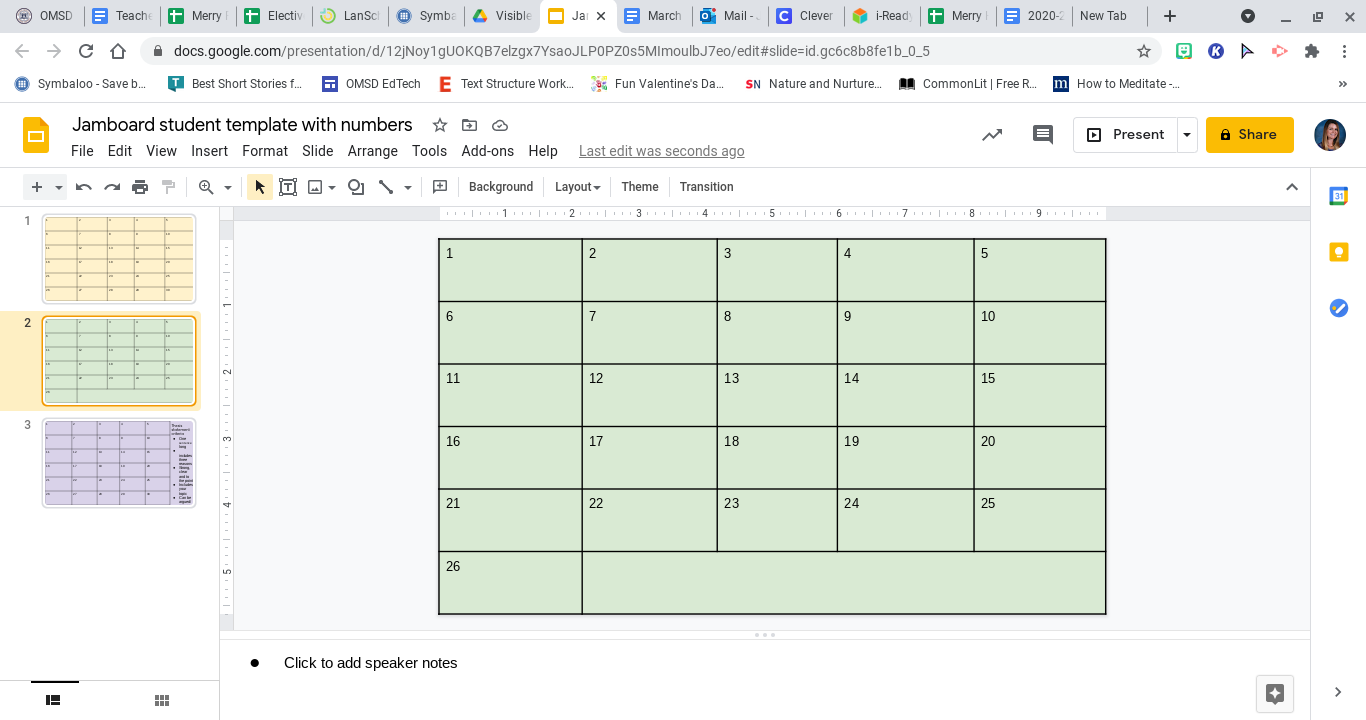
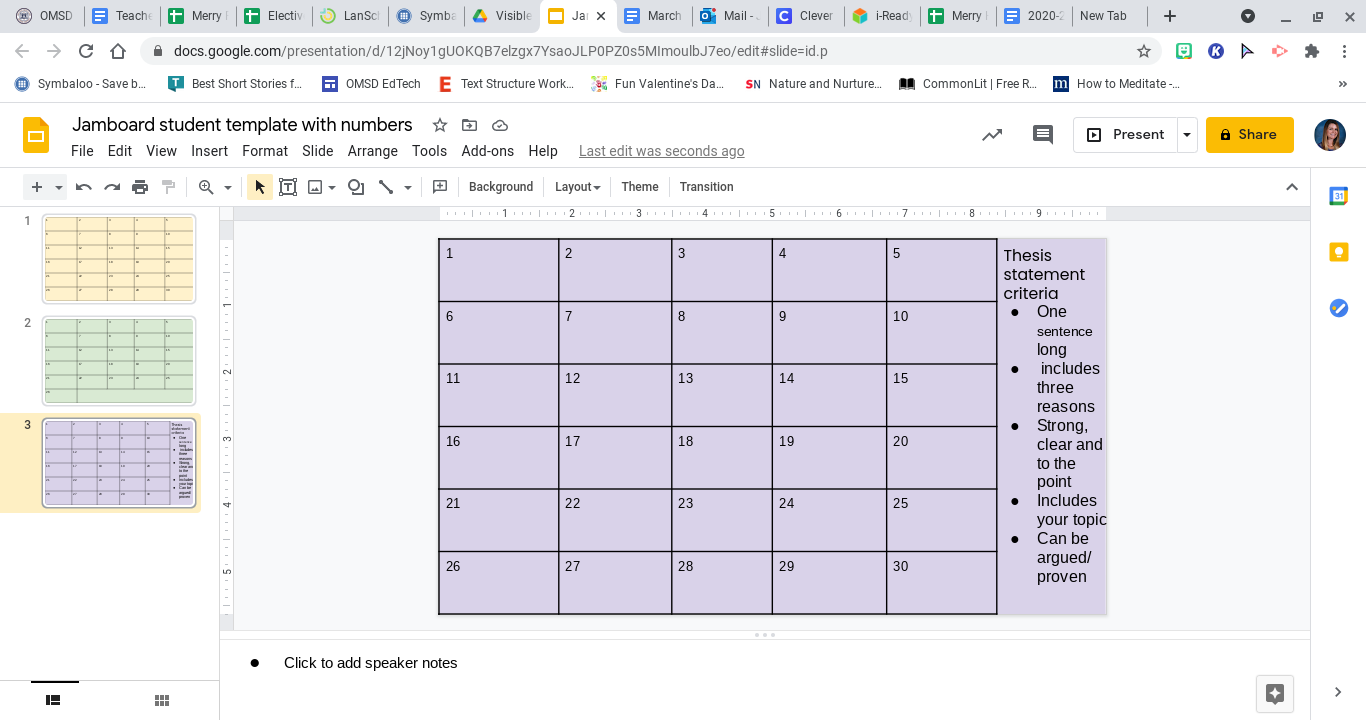
  1. In Google Slides, I created a blank slide with enough spaces for the total number of students I have in each class. I have 26 in one and 30 in the other. To make these spaces, you go to the top toolbar> insert> table> 5x6, and then format. 


  1. Then you can add the task instructions in the space on the bottom or the side of the slide. I find it easier to type out the task on slides rather than on Jamboard. 


  1. Next, you have to download the single slide onto your computer or into your Drive. To do this go to the top toolbar> file> download> JPEG image. If you are working on a laptop or desktop, the JPEG should download onto your files, and if you're using a Chromebook, then the JPEG will download into your Drive. 

  2. Finally, you go to a new Jamboard and set the background. You'll see the original backgrounds, and then in the bottom right-hand corner, there will be a box with the image to the right. Click on that and upload your JPEG from your computer or
    Drive. 

Once your interactive template is created, you can share the click with your students through Google Classroom or the chat. Below is an example of one I did with my 6th graders for the first draft of their thesis statements. 


Students posted their thesis statements after researching a topic of their choice. As you can see, I can easily see who didn't participate right away and ask them to hang back during break or keep them in the main room while the rest of the students work in small group breakout rooms. I also can make each sticky note bigger to read their responses and check for understanding. This lesson took 10 minutes to plan and create and about 30 minutes to run through in the virtual setting. 


Please let me know of any ideas you've tried out on Jamboard!

Jenni Merry


Wednesday, February 17, 2021

Less Teacher Talk and More Student Talk

    While talking to some of my colleagues last week, we all shared that we were shocked that we were still teaching remotely. For most of us in San Bernardino County, we have been teaching virtually for almost a whole school year. A year of creating and recreating content. A year of computer screens and zoom meetings. A year of teaching students how to submit an assignment on Google Classroom. And a year of how to learn from afar. I know I’m not alone in feeling frustration and sadness over this complicated year. If we could have guessed how long we would have been doing this, we would have started the year differently. 

    One thing I know I would have done differently from the beginning would have been to use structures to get my students talking more. At the beginning of each school year, I’m always exhausted from introducing my to-do classroom strategies and structures to my new students. This school, I was so busy trying to figure out how to teach this way that those strategies and structures were forgotten. Then, in November, I remember still being exhausted, and I noticed it was from doing all the talking and doing! My students were still working hard. It was fair to give them grace, but my normal high expectations were significantly lowered. I was not having students share their thoughts and ideas as I did before. Because of this, my students were disengaged and disconnected from their learning.

    To get students engaged and connected to their learning, I needed to make changes. Here are a couple of things that I started implementing in late November and continue to do to get my students talking more and me talking less:
  1. Wait time with music:
    I’m not good with long silences in the classroom, and it makes me even more anxious in the virtual setting. Thus, it made it easy for me to talk more when my students did not answer or share their ideas. To give students thinking time, I started playing a couple of songs as informal timers. To do this, I created playlists (you can use Apple Music or Spotify) to use with my students. I give my students a task and set the expectation that they should be ready to share out after one song. This structure has increased the number of students who share and gives students time to ask me for clarification in the chat (if needed). Speaking of the chat...
  2. 3-2-1-Waterfall: One fact is that most of our middle school students do not feel comfortable sharing their ideas aloud. This is true in the physical classroom and extends to the virtual one. The plus of a virtual classroom is it has the chat to share ideas and resources. One structure that I’ve been using is called 3-2-1 Waterfall. This is where students type out their response to a prompt into the chat, but they do not send their answer until I say “waterfall.” I do this to give students time to think and type and also so I can ensure that ALL students are answering. I wait to look at the chat until I have my magic
    number (the number of students in class that day). While I’m waiting, students are asked to look over their classmates’ responses and choose one that they either agree with or respectfully disagree with. Next, I cold-call (randomly using
    Flippity spinner) on students to share a response that they either agree or disagree with aloud with the class. This structure has helped students connect with their peers and feel safer sharing their ideas since someone else feels the same way. When we started this, I would share a couple of sentence frames to help them organize their thoughts (See picture to the right). 
  3. Ice breaker and breakout rooms: I don’t know if it’s just my 6th graders, but I would put my students in breakout rooms to work on a shared task, and they would just stare at each other. However, I recently noticed that my students LOVED participating within breakout rooms if it was ice breakers. Therefore, I started planning to do a simple ice breaker in breakout rooms at the start of the class to get my students talking to each other and then use those groups to complete a shared task. Two that have worked great are zoom roulette and silly stories.
  • Zoom roulette: The teacher gives their students a question like “Who is your favorite YouTuber?” or “What’s your favorite thing to do on the weekends?” The students are placed in random 2-3 people breakout rooms and given 1 minute to answer the question. The teacher closes the room and asks students to share out either their answer or their partners. Then you repeat for a couple of rounds with different questions and partners. Later on, when it’s time to work in pairs, you explain the task and open the same rooms. My students seem to be more talkative with the partner that they have already worked with that day. 
  • Three-word stories: My students have become pros at this one! For this one, I randomly put my students in a breakout room in groups of 4-5.
    Their first task is to rename themselves by their breakout room number and then alphabetically (For example: if I were in room two and the 3rd person alphabetically, my name would be 2-Jenni-3). After they rename themselves, you bring them back to the main room to give them the story prompt. You can use any three words: My cat is… Once upon a… The craziness thing… One weird day… Students are instructed to all keep track of the story because they don’t know which seat number (alpha number) I will call on. Then, students are placed back in breakout rooms, and in alphabetic order, they create a story by only adding three words at a time. After 3-4 minutes, rooms are closed, and students come back to share the story (These stories are hilarious). Finally, after the lesson for the day, students are put back in the same breakout rooms to work on a shared task. 

I hope these structures give you some ideas to use in your virtual classroom and give your teacher voice a much needed rest!

Jenni Merry 


Tuesday, January 19, 2021

Forever in the Middle: Reading Novels Virtually


Reading Novels During Distance Learning


I love reading great novels with students and that is the biggest thing I miss from having students in the classroom. It also wasn't something I was willing to give up during distance learning. In the Spring, my classes were about 2/3 of the way through The Giver when schools shut down, and this school year, my classes have read one novel and started a second last week. Figuring out how best to do this has been a continuous challenge so here is a little insight into what did and didn't work for me.

A Shift in Focus

I use novels to reinforce and practice ELA standards in the classroom.  Since we are so much more limited on instructional minutes this school year, I have had to remind myself that if the students don't understand every single detail of the texts, it's okay as long as they can apply what skills they practiced to new texts or make connections to new material. 

The focus is not on the book itself, it is on the standards while using the book as a resource. 


What does this look like in my online environment? My seventh-grade class is using their novel as a supplement to the current unit where we look at the differences in the way people live in other parts of the world. My intervention class is using their novel as a way of identifying narrative techniques and practicing literature analysis as well as responses to literature: areas that they need extra practice with. Earlier this year, we focused on similar standards with the 8th grade ELA classes as we read The Outsiders.

Asynchronous Reading With EdPuzzle

My eighth-grade students read The Outsiders in the Fall and I was happy to find the chapters available on EdPuzzle. The benefit of using this was that I could see exactly who was completing the reading and I also was able to have them answer questions along the way and received instant feedback on their learning.  The challenge was that the students who really enjoyed reading did not enjoy having to listen to someone else read and the students who were not self-motivated did not complete the reading at all. However, I did like the idea of using EdPuzzle and the feedback I received from it. In the end, it was not the best choice for me.


Synchronous Reading During Zoom

My students last year finished The Giver over Zoom. Since we didn't have a set Zoom schedule like this school year, I scheduled "Reading time with Mrs. Valverde" for anyone who wanted to read the book along with me. Attendance was not mandatory and I had a group of around 10 very dedicated students attend each day. They even asked to extend the time past finishing the book to read the next novel in the series. 

This semester, I started reading Forged by Fire with my 8th-grade intervention students and The Bridge Home with my seventh grade Language Arts class. I am reading about 10 minutes at the beginning of the period with each of the classes and using the chat in Zoom to receive feedback. This has worked fairly well. Also, both of the texts are on Actively Learn, which allows me to assign chapters to students to read and even include questions for them to answer at the end of each chapter: another way to check for understanding and keep the students accountable to reading. I can start the day's reading with them and have them finish it asynchronously after our Zoom class is over. 

Virtual Literature Circles

In the Fall, my 8th Honors ELA class read through The Outsiders at a much faster pace than the other groups. This allowed us to run digital literature circles with the students. I had a shared document where they were responsible for specific roles as they would have in a traditional classroom. They then signed up as a group to meet with me over Zoom twice during the four-week session. During this reading club meeting, they were given time to discuss the book with each other in real-time. 

My only role in this was to provide them with the time over Zoom and to listen in on their conversation. I could easily tell who was reading the book by the connections they were making and discussions they had during this time. This worked for 7 of my 9 groups. Two of the groups struggled with members who didn't pull their weight but overall, it was a positive experience. 

Don't let reading a novel with your students virtually intimidate you. I do miss actually feeling their reactions to things that happen in the books we read, but reading something together with a class is too magical for me to give up, even if I miss out on some pieces of it. It all comes down to what you find the most value in for your students. Whatever you choose to do with your students over the next few months, don't feel limited by online learning, but instead view it as an opportunity to do things differently. Who knows? Maybe you'll end up finding a strategy you love and can continue doing when we return to school.


Keep the magic alive, 


Kandyce Valverde

Wiltsey Middle School
7th/8th Language Arts

Friday, January 15, 2021

It's All Fun and Games…

Photo by John Benitez on Unsplash

… but nobody has to get hurt! We are well into this year of remote teaching/ distance learning. I'm sure most of us have reflected endlessly on what we could do to engage our students more. Asking questions like: how can I make learning more enjoyable? Will today be the day that I spark some joy into my students' (as well as our own) lives? Most days, I turn off my computer, feeling like a failure. 


Over winter break, I allowed myself to not think about teaching in January, and I enjoyed my time with my family. We read books, I wrote, we baked -an insane amount of- cookies, we watched movies and shows, and we played a lot of games. My daughter is 3, so she's pretty easy to entertain with a simple game of Memory, but my son is 17 and not as easy to entertain. However, he even found our game time fun. We played dominos, cards, and board games almost daily. And even though I told myself not to think about teaching. I, of course, did. I wondered how I could foster this joy of playing games with my students in a virtual environment. 


At first, I thought about holding a Game Night with my students (which I still might do!). Then I thought this might be a way to fix a frustrating problem I have right now with my students: getting them to come and return to "class" on time. So that is what I have started, and so far, it seems to be working. I am using the first 5 minutes of each class's start (the start and after breaks) to play games with my students. We start playing right at the start time, and as kids join a bit late, they can choose if they want to participate in the game. The beauty is if they are a couple minutes late, they aren't missing anything academic. The great thing is I have more students logging on to our meetings on time, both at the beginning of class and after breaks. Not only is this working to my advantage, but I see some smiles here and there, which is 6th grade speak for "I'm having fun." 


*I found most of these resources on Teacher Pay Teacher already created by Golden State Classroom, which was nice and cut down on my prep load. 


Here is what I’m doing: 

Mondays: Word search/ collaborative puzzles: 

I love puzzles! On Mondays, I create and project a word search for students to work on. I've created word searching with vocabulary words, themes, book titles, and students' names. They use the chat on zoom to share the answers with the words they found. We only do this in 5-minute sittings. Therefore, they usually do not complete the puzzle even as a class, but I share the link with them to complete it if they want to. 

The collaborative puzzle is a site I just found, and I'm obsessed. To create and share a puzzle, you go on to the site, find puzzles, search for a piece of art that you are interested in, and select multiplayer. Finally, you share the link with your class. If students are interested in solving the puzzles, they click on the link and start moving the pieces around. So easy and so fun!


Tuesdays: Name the Gibberish 

This game is FUN! My 6th graders are so much better at it than I am. I found this resource of Teachers Pay Teachers (Golden State Teacher). You share the slide in presentation mode, and students raise their hands to guess the saying. We do about 3-4 right after the break, so I use the same slide deck a couple weeks. The example pictured on the right says, "Dog sledding." My students guessed that right away while I was still trying to figure the answer out. They love that they are better than their ELA teacher at this game. 


Wednesdays: Sixty Second drawings

Sixty second drawings (also from Golden State Teacher) is precisely that. You give your students sixty seconds to draw an object. Sounds easy, right? Well, after you get your students started with the easy level, you can move them up a level where they draw the object with their eyes closed. And when that level gets a too bit easy for your students, try the EXTREME level where students draw the item with the paper on top of their heads. If nothing else, this game is the most entertaining game to watch. 

Thursdays: Scattergories

Most of us have played some version of Scattergories before. To play this over zoom, you will want to create at least 20 lists (I use two a week depending on our schedule.).  Before I share the list, I ask a student to give me a letter. Then, I show the list of items and give the class two minutes to create their list with the given letter. After the time is up, students share out their answers. If someone has the same answer, they cross off their answer and they don’t get the point. When we have shared answers, they share their total points in the chat. I like this game because it helps students with word choice and being creative. 


Fridays (office day): 

Fridays are our office days, so we don’t have time for games. However, I do make sure to share some of the games that we played in Google Classroom. I do this so that students can continue playing on their own or with their families. 


I hope you can find some time in your schedule to play a couple of games with your students. I think it’s a nice way to remind my students that I care about their happiness and well-being.


Have a FUN week!

Jenni Merry   


Monday, December 7, 2020

Powerful Thinking Routines (That Work Online Too!)


I’ve said it before, and I’ll say it again: “Making Thinking Visible: How to Promote Engagement, Understanding, and Independence for All Learners,” written by Ron Ritchhart et al., is the best professional development book I have ever read. I was introduced to this book during a district book club in the spring of 2017. I love two things about this book: 1) how easy it is to use across disciplines and 2) that I can use various routines depending on the text I’m using and the thinking I’m hoping to foster within my students. Over the last three years, I have used each of the thinking routines multiple times. I use them so much that my students wind up learning many by name. 


During distance learning, not using these thinking structures has been frustrating for me because of how often I used them in the classroom. I thought about how I could virtually recreate the routines, but I couldn’t visualize how it would have the same impact. So, with the stress of everything else, I put this recreation on the back burner. Then, an educator friend then shared this article with me, and I was instantly excited by the possibilities. 


Since reading the article, “Support Online Learning with Powerful Thinking Routines,” written by Caitlin Tucker, I have been able to use a couple of the thinking routines in my virtual classroom with my students. Tucker took five routines and “created Google Slides for teachers to copy and use in an online learning scenario. Each slide deck focuses on a specific thinking routine and is designed to engage the entire class. That way, students can learn with and from each other.” Each slide deck has 30 copies of the same slide so that each student may work on their slide and have the ability to see what their classmates are thinking. The teacher may also share a particular slide with the whole class to showcase certain thinking. 


Here is the first thinking routine that I introduced to my students: 

Chalk Talk 

What? This routine helps students build understanding in a collaborative way by putting forward ideas, questioning one another, and further developing the ideas. 


How? I used Jamboard to do this with my students. I started with a question in the middle of the board and asked students to respond using a yellow post-it. They were given 2 minutes to add their initial post-it. Then, I gave them two minutes to read over their peers’ answers. I invited them to reply to one of their classmates’ thoughts with a green post-it. On this green post-it, they could question their peers, agree with them, or challenge their thinking. Finally, I asked students to read through the post-its for the third time
and respond to an original post or question in a pink post-it. 

When? Over the last two weeks, I’ve used the chalk talk routine three times with each of my classes. We’ve used it with an SEL lesson (pictured), an ELA writing brainstorm, and a reading discussion. My next step with this routine is to have multiple questions on different slides of the Jamboard for students to choose which questions they’d like to answer. 


What students think? One student said that she loved how this routine “forced her to read her classmates’ thinking.” Overall, I felt that my students were more engaged than our typical lessons, and I felt like my old teacher-self, which puts a smile on my face. 


Jenni Merry 

Wednesday, November 11, 2020

Procedures and Routines Are What We Need!


As classroom teachers, we are used to teaching and strengthening classroom routines and expectations. You work with your students to determine class procedures, like how to transition from one subject to another or when and where to turn in their homework. 

This school year, we've had to create a whole new set of norms and expectations, but they are still based on what we know and teach
regularly. 


What norms do you need to set, and how can you do so effectively? 

1. Norm #1-Keeping Clear Concise Expectations
Helping students understand what is expected academically, socially, and behaviorally is key to running an effective classroom, which means we need to prioritize this concept for online teaching. I mean, seriously-How many of you still have kids ask to use the restroom the minute they return from virtual "recess"? I do!  Interpreting your expectations is key to a well-run classroom, whether it's virtual or traditional. If students don't know what the rules are, they probably won't follow them. Students entering the physical classroom are exposed to a rule-based system. For online learners, class participation and academic goals are now being infused into our students' homes where they can be easily distracted with home life.  
The communication of classroom policies is an ongoing conversation rather than a chiseled law. Remember that the physical classroom is a consistent experience for students, but homes are not. Consistency is key.  Consistent schedules and routines create a sense of normalcy and comfort for students, especially young learners.  I have made sure to keep the same routines I use in the physical classroom and have adapted them for online learning. I have a daily schedule that I stick to and like to use repetitive activities, songs, and videos to offer security. Students can expect a particular flow in your classroom, so you want them to have the same in their virtual classroom. For example, I like to use a poster of Rules for Good Listening in my classroom. It has a boy using good listening strategies. I say, "Who looks like Buddy" (that's his name), and my students immediately react and look like him. I sent home a small-sized Buddy poster with each student. Their families taped it next to the computer. Now I say, "Who looks like Buddy?" and I have their attention. Students know to cross their fingers to use the restroom. They know callback routines are expected. The list goes on. My point is that the routines are taught, practiced, and expected. 
I also created a survey that you send out, asking students their feedback on how things are going and what they need to be successful. I sent the same survey to their parents. Just like in the physical classroom, it takes a village. Most importantly, in these times, we need to use the feedback we receive and be flexible in revising or personalizing our classroom policies and routines when necessary to meet the needs of all learners and their families.


Norm #2-Provide Materials Needed for Success
Exemplifying clear classroom expectations and procedures is only half the battle in ensuring that all of our students have the tools they need to be successful in our online classrooms. It is just as essential to ensure they have the materials necessary to accomplish your set goals. The word materials take on a new meaning in a remote learning environment. In addition to what we regularly provide - texts, workbooks, and supplemental materials (whiteboards, manipulatives, etc.), we can also take advantage of all the fantastic online resources given to us in the last few months. I am immensely enjoying Seesaw, Zoom Polls, a wide range of online learning videos, Lanschool, and Peardeck. Also, I try to make an effort to keep a record of the materials that students need.  I regularly ask who needs pencils, dry erase markers, highlighters, books to read, etc. Then I ask families to do a quick school pick up to resupply them with what they need. Remember, a well-prepared student is a successful student which will make your life a lot easier.  
After providing students with what is needed, it's important to reinforce the procedures to successfully use these materials and the best way to organize them. Students need to be taught and guided on the importance of knowing where their materials are and accessing them quickly to maximize instructional time. Now that I am too working from home, I tell my students that I also have to stay organized. I help them understand that if I'm not organized, I cannot be a good teacher; just like they are unorganized, they cannot be responsible students. I even show them my 100's of Post Its, that keep me organized and accountable! You know you have them too.      


Norm #3- Never lose the encouragement and positive feedback. 
Positive feedback is key to instilling self-worth, confidence, and motivation in our students, but for some students, those kinds of interactions are hard to come by in their lives outside of school. This makes it that much more critical that the classroom should always be a safe and encouraging environment. Encouragement is a crucial classroom routine that cannot be lost in online learning. Without any encouraging words, learners are likely to shut down. In online learning, you can use some of what you've always used-positive praise and cheers, Dojo points, and smiles. But I know we need more, right? I've been using digital sticker/brag tag books on Seesaw. What kid doesn't love a sticker? My kids get stickers for attendance, I-READY, Reading Counts, behavior, celebrations, and completing asynchronous work. Students can view their individual books on Seesaw. I also have been sending home "Happy Mail"- This is a positive note of encouragement or certificate for going up in fluency, passing an I-READY test, or reading books on EPIC. After starting this, some of my kids read over 300 books on EPIC, and I have had almost 100% complete their I-READY and Reading Counts assignments daily!


Direct, positive teacher feedback will always be valuable, whether in person or online, to students and their families. I like to take advantage of online learning and praise not only students for their hard work but also their families. I've been so impressed with the amount of time and effort my families have put in to support their children.  I am always singing their praises and building that relationship because, again, it takes a village. Lastly, I've always believed in the power of peer praise. I am teaching my students to cheer and praise each other for their accomplishments. It's heartwarming to hear my students praising each other online!  

So remember never give up and keep on modeling those expectations, providing reminders, and giving students ample opportunity to practice. Don't forget to praise your students and yourself. You're doing great! And remember to give your students and yourself grace as we all adapt to this new learning environment.


Positively Teaching,  
Randi Muehlen

Tuesday, November 10, 2020

Surviving Online Learning

    As many teachers would agree, we were not trained or prepared to teach students online during a global pandemic. In March, we had to search for resources to help us finish the year online. For some, it was hard but manageable. While for many others, it was a difficult transition. Many felt lost and confused about where to go and what to look for. They were struggling with teaching online. What I have discovered during this pandemic and "new" normal is that as teachers, we always roll with the punches and make things work to the best of our ability. What works for some teachers may not work for others. What everyone needs to do instead of judging what others are doing is we need to give each other grace during this time. If you are struggling to survive, do not worry, I am too. I am in survival mode. Below are a few tips on how I have learned to survive during this time.

    First, I did some research and found many teachers on TpT that I have gotten resources from have social media and blog posts. Many have worked tirelessly to turn their products into Google Docs, Nearpod, Boom Cards, and Seesaw resources. They have also posted how to use their resources and share ideas of what they are doing in their classroom. I found this extremely helpful in discovering what works for me. As teachers, I believe we are one of the most generous communities out there. There are many teacher sites that share ideas and resources for free! There is a group on Facebook that shares Google Classroom Ideas. But, my absolute favorite is Bitmoji Classrooms!! You may have to request to join these groups, but they share awesome resources. The Bitmoji Classroom group shares tons of Google resources that you can use with your students!! I teach kindergarten and they have many phonics and reading resources. They are willing to share as long as you give the creator credit and make a copy of their document. This is a game-changer and has saved me time and energy of creating my own resources! They also have teachers that share Wonders and Eureka Math resources, you just have to search for them. I use a Wonders Google Doc every morning with my students. It does take time to look through these resources, but I promise it will be worth it!
    Next, collaborate with your grade level team. This will save you time and energy. If each member shares what is working for them and what is not working, you can encourage and support one another through this. Building a community with your grade level team will not only help each other but your students as well. Use each other as a resource! They can help you if you are struggling with ideas. I understand that not all grade levels work this way, but at least try to find one person you can go to. I have that person and I talk to her daily through text and email, plus we Zoom as often as our schedules will allow us to. She has been my lifesaver! She has been there to offer support, vent to, and to plan with. She has had great ideas and kept me from falling apart. I have also returned the favor and given her resources, ideas, and support when needed. 
    Finally, give yourself a break! No one knows what is expected during this pandemic. None of us have ever been through a pandemic and switched from in-person to online learning in the blink of an eye. There are no exact guidelines on how this should work and what we should be doing. We have no control over it. However, we do have control over how we respond to it. We can overly stress about it and let it take control, or we can just breathe and take it one day at a time. You are not the only one going through this. To quote High School Musical, "We're all in this together!" Take breaks when you need them. Go for a walk, exercise, read a book, talk to friends and family. Don't let this stress take over your life! This too shall pass. I have discovered that watching reality tv and playing with my new Siberian Husky has given me that much-needed distraction. I have learned that I am not going to be as amazing as some other teachers I know and I am not going to be 100% great at this, but at least I am trying daily. I am not giving up, I am doing the best I can, and most importantly I am there for my students. I bet they are having a much more difficult time than I am with online learning. As long as my students are learning, they are engaged, and they are having fun on our Zoom, that's all that matters right now. Remember, you are their break from their home life and you give them something to look forward to every day. Give yourself time and grace during this time! It will be alright. 
We Got This!
Marcy Mesa


Monday, November 9, 2020

Forever in the Middle: Zoom Chat Participation


Zoom Chat Participation Made Easy

When we started distance learning this school year, I felt like the most time during my day was spent filling in attendance records and tracking participation. It took HOURS of my day; there had to be an easier way. I tried using the Zoom attendance report or the Zoom chat to track participation and attendance but it still required quite a bit of work on my end to manually cross-reference my roster and the reports. 


That's when I showed my husband what I had been doing. He took a look and immediately saw an opportunity for improvement using automation through Excel. He and a friend put together a template on Excel where all attendance and participation counts are automated based on chat and attendance reports. 


I make it a point during my Zoom lessons to ask students to respond to questions in the chat. This encourages whole class participation and students can select to respond privately to me or the whole class. With Middle School students, it's not always easy to tell if they are actually paying attention to the lesson so this allows me a way to keep track quickly and easily so I know who to follow up with.

 Now I can take attendance in under 30 seconds and can also track participation in about the same amount of time. It gives me an immediate idea of who is engaged and who isn't. It has been a complete and total game changer! See below for a video walkthrough of what it can do or skip ahead for a step by step guide. Here is a template you can use yourself


Click here for a video walkthrough of how to set up and use the template


A step by step guide to using the template

1. Set up the spreadsheet in columns A and B with student last names and first names. You can copy and paste these from your roster on Q. The template will automatically switch the names as they appear on Zoom (First then last name).


2. To take attendance, open the Zoom report and click on "show unique users" then export it. It will open in Excel. Copy column A which contains the student names. Then paste it into column F of the spreadsheet.


3. To track participation in the chat, open the saved chat from your files. It will open as a text file. Then select all and copy the text. Click on cell H3 of the template and paste. This will paste all student responses from the chat. The spreadsheet then extracts student names from the chat history and counts how many times they responded. The counts then show up in column D of the spreadsheet next to each student's name. 

Keep the magic alive (even through Zoom),


Kandyce Valverde


Most Viewed Posts