Showing posts with label collaboration. Show all posts

Tuesday, September 28, 2021

What does that word mean?

Vocabulary is one of my favorite things to teach. It is also so very important. Vocabulary is an essential aspect of reading comprehension. If students do not know what the words mean, they cannot understand what they are reading. Unfortunately, many of our students struggle with oral language skills. This is due to many reasons, but all in all, most kiddos tend to be lacking in oral language development and vocabulary. 

So, what can we do?

As teachers, we need to be intentional about teaching vocabulary. We have to take the time to teach vocabulary to our students. We cannot just rely on discussing words that we may come across in our read-aloud. While it is essential to discuss unknown words while reading, we also need to explicitly teach vocabulary words to our students daily. Primary students learning academic vocabulary show more significant benefits than starting later when they can already recognize and read the words. It gives me the impression that there is urgent importance to learning words orally to then read and understand them later. To teach big words correctly, it’s vital that we teach them in developmentally appropriate ways to build schema. 

I've developed a well-balanced system that quickly builds my primary students' oral vocabulary.  I'm excited to share all of this with you in this post so that hopefully, you can use ideas that work best for you and your classroom.


Introducing the word
When I teach vocabulary, I often have the kids engage by providing several different versions of a word.

1. Dictionary definition
2. Comparison (it is like____, but different because______.
3. Real-life examples
4. Graphic version (drawings, pictures, representations)
5. Acting it out


Students need “kid-friendly” definitions of vocabulary words. Did you ever have to look up words in a dictionary and write the definition? I know I remember doing that (not in 1st grade, of course). While I know that learning dictionary skills are fundamental, this is not an effective way of teaching new vocabulary to primary students. An example, if I look up the definition of the word physical, it says, “relating to the body as opposed to the mind.” For a first-grader, this definition would only lead to looking up the words relating and opposed. Students need us to provide them with definitions that they are going to understand.

My students sit on the rug next to their Kagan shoulder partner.  

1. The word is presented on the Smartboard (Wonders Vocabulary words) with visuals and student-friendly definitions.

2. Students repeat me as I read the definition and example.  A relatable gesture that I make up that makes sense to kinesthetic learners is added most of the time.

3. A question for students to answer using the word in context- An example, I would ask my students some questions for the word "distinguish": What's one way to distinguish your left hand from your right hand? I give them think time and then have them A/B partners talk about their ideas. As I bring them back- students volunteer their thoughts. I'll then give them my answer/example: I show them to make an L-shape with their pointer fingers and thumbs. The left hand always makes an L, while the right hand makes a backward L.  How can we distinguish whether someone is happy? Sad? (facial expressions are essential for the image)
What distinguishes Mama Bear's chair from Papa Bear's chair? (one is soft and one is hard)
How do you distinguish between yourself and a friend? (personalities, physical characteristics, etc.) Students are given think time for each question and partnered to discuss their responses and then share with the whole class.  

4. Students must have texts read to them to discuss and play with the words.  I love to use the Interactive Read-Aloud Cards that are included in Wonders. All of the vocabulary words are included with examples in the text and relatable real-life examples and questions. These stories are fun and easy to understand. Also, they align with your Essential Question and Genre for the week. 

Please see video below of me teaching a vocabulary word. 


Emergent readers

The vocabulary words I am teaching are for oral comprehension. I want students to listen for the words in context that support where they are developmentally. I also want students to understand the new vocabulary and use it while communicating in class and at home. Nothing makes me happier than when a parent expresses how much their child's vocabulary has grown by the end of first grade. To make this happen, students need multiple exposures to learn new words. It can take a student numerous exposures to learn a new word depending on their previous vocabulary knowledge. We cannot mention a word once and expect students to understand and use the word. It is not enough that kids learn the meaning of the word, but they have to learn to use the vocabulary while speaking. Our daily instruction should create opportunities for kids to use words in all of these ways. For instance, the quick vocabulary conversation described earlier can be done with kids working together to come up with those multiple examples using definitions. This kind of cooperation requires that kids talk with each other about the words. An activity I use is to assign a different word to each group to discuss, illustrate or act out and then have them come together as a whole class to teach each other the word and what they discussed. This emphasizes collaboration while speaking and listening and is a great way to review more than one word at a time. I also reward kids for using the studied vocabulary words while they are speaking. 


Don't Forget to Review.  
It can be challenging to retain vocabulary if you are not given opportunities to use it. We may teach vocabulary because certain words will be included in the texts we were reading that week, but then students might not see them again for a long time. There are many ways to continuously review vocabulary, such as having one day a week when you only work with words that have been taught in the past or making a visible list of vocabulary words and using them as necessary.  


Teach Vocabulary All Day Long
To help develop word mindfulness with our students it is important to stop and identify unknown words from all subjects.  When students become comfortable expressing their lack of knowledge of particular words, they will be more likely to resolve those gaps when reading and comprehending. Students become motivated and confident if they know they can stop me at anytime and ask what a word means.  One of our class mottos is to “Always ask Questions!” In with that being said- What questions do you have? Feel free to email me with any questions ! 


I hope you found this helpful and gets you thinking about how to include academic vocabulary into your everyday teaching.


Positively Teaching,

Randi Muehlen

@positively_teaching

Friday, March 12, 2021

How to Hold Students Accountable with Jamboard


Out of all the new tools I've tried this school year, Jamboard is my favorite! I love how easy it is to create, share with students, and collaborate with this tech tool. My students also loved to use it for brainstorming within their groups and with the whole class. The more I used it (like most things), the easier it was to use. The only negative I found to Jamboard was I could not easily keep track of which students were actively engaged in the learning and which students were not. 


I tried to keep track by crossing off my students' names on the rosters or just getting a total count, but I still found it difficult to hold students accountable and to check for understanding. Those two things are what I've struggled with most during distance learning, so when this new tech tool didn't work the way I needed it to, I became frustrated. Then, the Jamboard gods answered my prayers and let the user upload a background. This was a GAME CHANGER!


With the ability to create or upload your own background, you can make interactive templates to suit your instructional needs.


Here is what I started doing for accountability and checking for understanding: 


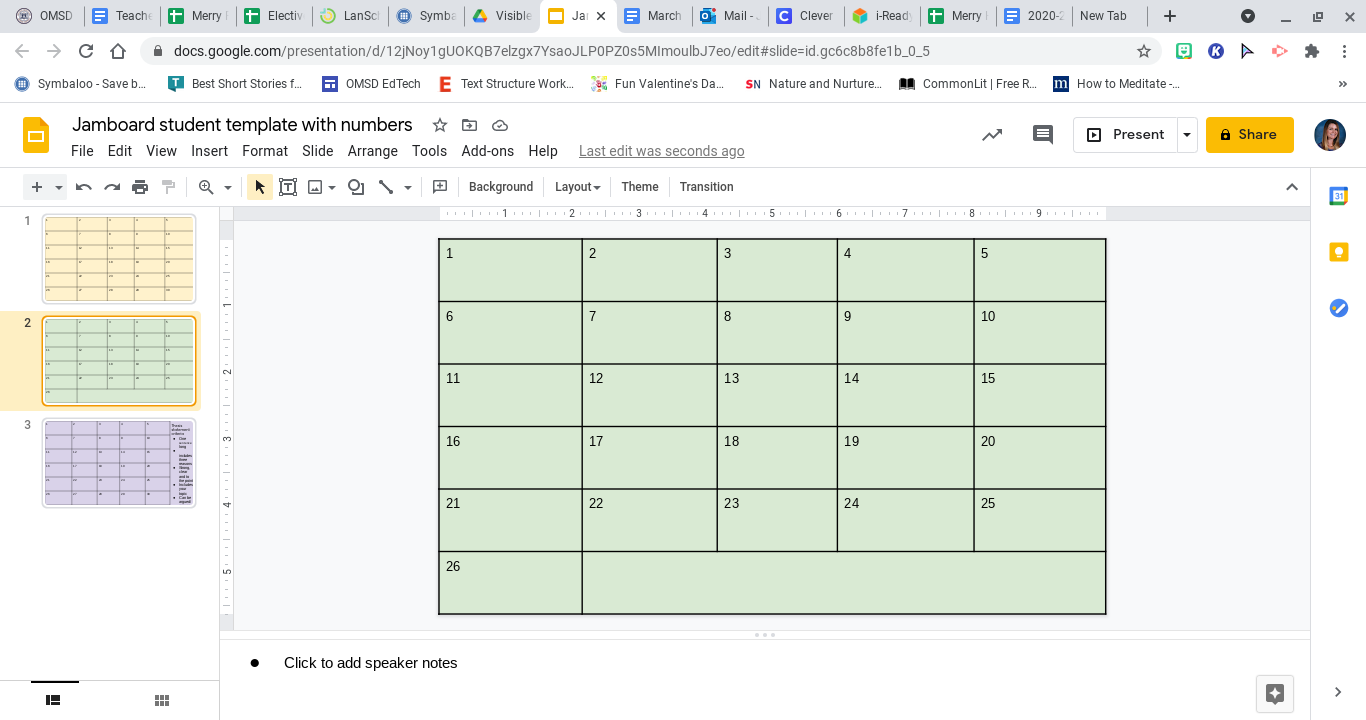
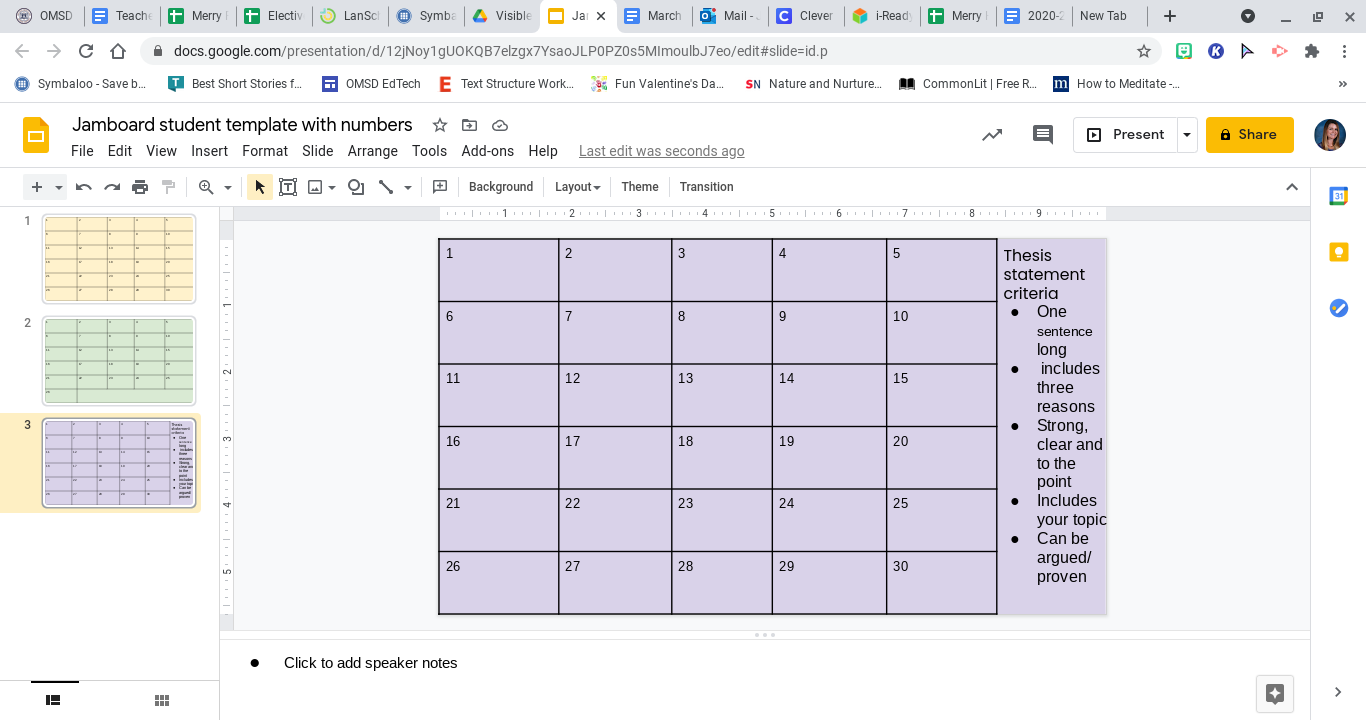
  1. In Google Slides, I created a blank slide with enough spaces for the total number of students I have in each class. I have 26 in one and 30 in the other. To make these spaces, you go to the top toolbar> insert> table> 5x6, and then format. 


  1. Then you can add the task instructions in the space on the bottom or the side of the slide. I find it easier to type out the task on slides rather than on Jamboard. 


  1. Next, you have to download the single slide onto your computer or into your Drive. To do this go to the top toolbar> file> download> JPEG image. If you are working on a laptop or desktop, the JPEG should download onto your files, and if you're using a Chromebook, then the JPEG will download into your Drive. 

  2. Finally, you go to a new Jamboard and set the background. You'll see the original backgrounds, and then in the bottom right-hand corner, there will be a box with the image to the right. Click on that and upload your JPEG from your computer or
    Drive. 

Once your interactive template is created, you can share the click with your students through Google Classroom or the chat. Below is an example of one I did with my 6th graders for the first draft of their thesis statements. 


Students posted their thesis statements after researching a topic of their choice. As you can see, I can easily see who didn't participate right away and ask them to hang back during break or keep them in the main room while the rest of the students work in small group breakout rooms. I also can make each sticky note bigger to read their responses and check for understanding. This lesson took 10 minutes to plan and create and about 30 minutes to run through in the virtual setting. 


Please let me know of any ideas you've tried out on Jamboard!

Jenni Merry


Tuesday, September 22, 2020

Forever in the Middle: Collaboration in a Digital Classroom


Online learning has definitely increased the level of challenge in education today. Many of the strategies we use in face to face instruction have to be adapted to our new online classroom environments. Here are some ways that my students have been able to continue collaborating while learning from home.

Insert Learning
There are so many digital platforms that provide articles and comprehension questions for these articles within the text. I have always been a big fan of Newsela and Common Lit for this reason and also recently discovered and fell in love with Actively Learn. While there are a plethora of articles available through these sites, I may have something that I would like students to read that is not already available. This is where the Google extension Insert Learning comes in handy. I can take any text from Google Docs and turn it into an interactive response. This is great for really focusing on exactly the questioning or standards I want to address with that piece. Options for your responses are open ended questions, multiple choice response, and even collaboration boards. You can also insert sticky notes and highlight text to really guide student thinking as they work.


                           Discussion feature on Insert Learning.
                    Students can view peer responses in real time.

Jamboard
I started using Jamboard when I saw an idea for taking attendance using Jamboard. I tried it out and loved the ease of it and immediately saw how it could be utilized in the classroom in so many other ways.  Recently, I also used Jamboard to create a brainstorm for class thinking map in preparation for writing. I gave them time to add to the thinking map then changed them to "view only" and then grouped and arranged their ideas onto a completed map that they then used to write from. We added transition words and decided what order to include all our ideas. From there, students were able to demonstrate that they understood how to turn a Thinking Map into writing by writing a short summary of the information on the Thinking Map.  With another class, I separated the students into groups. Each group was to read a section of the article then come up with a maximum two sentence summary of that section. Their summary was then posted onto the class Jamboard. Once all responses were posted, I changed their access to "view only" and they were then able to use this to review before continuing work on the article independently. 

            Cause and Effect Map                        Compare and Contrast Map          


         Jigsaw Article Summary


Padlet
This is an old favorite of mine. Students are able to respond on a message board setup in a variety of ways. They can simply post answers to questions, converse in a message board stream, and even respond to each other's answers. The free account allows up to 10 message boards, which I have always been able to work with. You can delete older boards once they are no longer in use. I use Padlet for ongoing discussion about something we are reading as well as a review of what we have already learned. 


Google Suite
Of course, there are always collaboration options through Google Apps. I have one of my classes starting book clubs next week in small groups of four and we will be collaborating using some of the above options but will regularly communicate using a group response form in Google Sheets and a weekly check in with Google Forms. The benefit of using both is that the students within the group can communicate with each other on the Sheet but they can communicate with only me on the form. This will allow me to see how they are all contributing and to alert me of problems that I hadn't seen within the Doc. Click here for a simple template for Book Club online collaboration.


This year is definitely not what anyone expected, but I know that we are all doing what we can to make the learning meaningful from a distance. Please share some of your amazing ideas below so we can continue to inspire each other!

Keep the magic alive,


Kandyce Valverde


Monday, April 6, 2020

Let's Talk Nearpod


Another free resource is Nearpod. It has interactive lessons for just about every grade level and subject. A lot of their lessons are free and you can save them to administer with your students when ever you see fitting. Because of our current situation Nearpod is completely FREE!😄 You can administer live lessons where your students follow your lead. This allows you to control their computer screen by moving from slide to slide when you do. Or you can choose the student paced delivery where students can complete their Nearpod lesson on their own.

Here is a quick review of the perks of Nearpod: 
  1. You can communicate with your students live
  2. Administer any assessment or comprehension questions with teacher friendly reports 
  3. User friendly, Google Slides or Power Point presentations can be uploaded 
  4. All students need is a log-in code or link to join 
  5. Nearpod is completely free right now (lessons, live & student paced mode)!
Here is a video of my students and I hosting a collaborative board live! This made my day since we were able to connect and chat during the beginning of our remote learning journey.


If I persuaded you to incorporate Nearpod into your teaching here is a video of how to create a free account, explore their lessons library and lastly how to administer a Nearpod lesson. 


Thank you for reading/watching my blog. I hope you are taking advantage of all of these free resources that allow us to connect with our students on a digital platform. Thank you for your time and I hope you are all staying safe and healthy. 

Learning & Growing,


Nancy Vargas 
nancy.vargas@omsd.net 
Feel free to contact me with any further questions about Nearpod 

Sunday, November 3, 2019

Forever in the Middle: The Global Read Aloud


The past two years in the Fall, I've participated in an awesome learning experience and global collaboration opportunity:  The Global Read Aloud. If you have visited my classroom during this month, chances are you saw this in action.

The Global Read Aloud is organized by ELA guru Pernille Ripp with the idea that students around the world are read aloud one common book. The goal is to promote reading for enjoyment and collaboration between students. It sounds pretty amazing, right?  It completely is!

Here is some basic information about the Global Read Aloud.

Book selection
The Global Read Aloud book selection begins months (maybe even a year?) before the Read Aloud begins. Books are selected for four age groups: picture books, early readers, late elementary, middle school, and high school. Once the books are selected, teachers can register for the Global areas Aloud, which helps the organization keep track of where schools are participating from. The GRA began in 2010 with 150 students and now has over 1 million students participating worldwide. The organization does not provide books or materials for the teachers.

This year, the books selected for each group were
Picture Book Study


Early Readers                     Late elementary           


Middle School                         High School  


This year my classes are reading The Bridge Home and it has brought up great questions about many relevant and heavy worldwide issues such as homelessness, gender equality, child labor, and even spousal/child abuse.

Types of collaboration
The easiest way to start working with other GRA teachers is the join the Facebook group. From there, teachers can start sharing ideas and make plans for collaboration. We have used Padlet, Flipgrid, "snail mail" postcards, GoogleHangouts, and Twitter slow chat to collaborate with our partner classes. Some platforms are easier than others of course and it is up to the teachers to decide what works best for them and how many connections they wish to make. I try to have my students collaborate at least once a week with another class.

Student feedback
I added a question to a quick quiz on the last few chapters of reading to get student input on their experience. Student input is often the most valuable of all. These are some of their responses:

  • "I think it's cool because we get to communicate with other people about the book."
  • "Getting to talk to people across the country and around the world is interesting because we see how they think."
  • "It's nice to know so many schools in the world are reading the same book as us. It's also a great way to discover books."
  • "It's just one giant book club and it expands my thinking."


I love each and every unit during the school year for different reasons, but the GRA is definitely a highlight of my Fall semester. The students, even at this age, love being read to and a bonus is that they are reading great literature and looking forward to talking about it.

For more information about the GRA, please see the FAQ page or comment below with your questions.

Keep the magic alive,


Kandyce Valverde


Sunday, August 25, 2019

So the writing journey begins...

The start of a new school year is always exciting.  Teachers return with a fresh mindset determined to
change or adjust instruction from last year....and....so the journey begins.  Last year, I focused my Spotlight blog entries in writing after participating at the Invitational Summer Institute sponsored through the Inland Writing Project.

As I implemented many new writing strategies into my classroom instruction, I felt that I needed to dig deeper in certain writing aspects and this is where a new year, a new journey, begins.  This year I will be focusing on explicitly teaching and practicing the 6 Traits of Writing more thoroughly.

The 6 Traits of Writing includes the following: ideas, organization, voice, word choice, sentence fluency, and conventions.  This month I am focusing on ideas.

Last week our class started a narrative story.  I had collected some super cool Writing Traits items like my Scholastic kit: The Trait Crate which includes mentor text to help frontload the six traits along with posters and a reference book.  I also had a Traits of Writing big book which someone had left in our community "grab-n-go" table of our staff lounge...(this was a treasure of a find!).

I explained to the class how writers sometimes struggle with not only coming up with ideas to write about but supporting details in order to expand on those ideas.  So here were two days worth of activities in a nutshell:

1.  Think of your comprehension skill of the week.  Ours was Problem/Solution.  Try to align this skill with a student-produced narrative essay.

2.  Provide students the "problem" of their narrative piece.  I gave my students the sentence "Suddenly, I heard the dark clouds roar like _____ and it began to rain cats and dogs!"  I left the line blank in order to review similes.  Students decide independently to write their own simile.  I also included an idiom as this was the vocabulary strategy of the week in our Wonders reading program.

3.  Students fold their graphic
organizer into six sections and draw borders using a sharpie.  They label the first two boxes "B," the next two "M," and the last two boxes "E."  These will be their beginning, middle, and end sections of their stories.

4.  I then proceeded to ask the class to think about something that may happen in real life that could be ruined by a sudden storm.  They came up with a lot of interesting ideas for their beginning event.  The problem would be the actual rain storm.  On the back of their graphic organizer, they selected their event and then proceeded to think about main characters, supporting characters and any details that they could possibly include in their stories.

5.  Next we proceeded to share these ideas for their stories with partners.  Students
gave each other feedback and encouragement to keep writing.

6.  I then allowed them two draw their panels with as much details as possible.  They could color their panels as well.

7.  They also received post-its and place the post-its on the panels in which they wanted dialogue.  They quickly "scripted" some dialogue on their post-its since this is part of the narrative writing standards for fourth graders.


8.  Now they are ready to write their first draft. After spending two days of sharing ideas, I feel they will have much more to write about during their first draft.

Happy Writing!
Gus Macuil


Thursday, May 23, 2019

What is Co-Teaching Part 2- by Ashley Ewert


What is Co-Teaching? Part 2-


by Ashley Ewert
In my last blog, I discussed the benefits students and teachers had in an inclusive co-teaching classroom. Co-teaching exist with a variety of approaches or models. Some of the more popular used models of co-teaching include one teach, one support; parallel reaching; station teaching; alternative teaching; and teaming. Refer to the image for a visual example of the various models. Each co-teaching classroom will utilize multiple styles in their classrooms and may even use a different form during each academic lesson throughout the day.


Common Models of Co-Teaching - 


One Teach-One Support

When teachers use a style of one teach one support, many students in the classroom can receive individual attention however if the supporting teacher always is in the same role then he/she begins to be perceived as an aide and not a teacher. The best time to utilize one teach, one support model is during whole group instruction.

Station Teaching
Station teaching is similar to what we know as centers. Students are divided between two to four groups and either work independently or with the teacher's support. Using station teaching makes it easier for instruction to be differentiated levels. Teachers instruct one station while other students at other stations work independently. The student to teacher ratio is decreased when implementing station teaching into the classroom. The best time to use station teaching is during a center time activity when students are rotating to different groups.

Alternate Teaching
In the alternative teaching model, one teacher is responsible for the large group of students while the other teacher instructs a small group of students. This provides unique opportunities to deliver intensive instruction and individualized instruction to all students. Alternative teaching can be utilized anytime there is a need for small group instruction. A suggested subject to use alternative teaching is during a math lesson.

"Alone we can do so little. Together we can do so much." 
-Helen Keller
Additional Models of Co-Teaching-

Teaming
When both teachers are teaching and supporting each other at the same time, the teachers are participating in the co-teaching model of teaming.  Teachers are equally contributing to the delivery of the lesson. Teaming promotes respect between teachers as they also serve as a model for students respecting one another. The best way to use this model is when the presentation of differing views and perspective is appropriate. 

Parallel Teaching
When the class is divided into two heterogeneous groups, parallel teaching can be utilized. Each teacher directly instructs the same content to half the group. The student to teacher ratio is decreased by half using this model. Some teachers have a difficult time adjusting to multiple people speaking at the same time, and it can be distracting for students as well. The best time to utilize parallel teaching is when the whole group would benefit from smaller group instruction when being taught the same curriculum. 

"We may have all come on different ships, but we're all in the same boat now." 
                                                                          -Martin Luther King Jr.


"To teach is to touch a life forever." Anonymous
Ashley Ewert
             

Wednesday, May 22, 2019

What is Co-Teaching- Part 1 by Ashley Ewert


What is Co-Teaching? Part 1-

by Ashley Ewert

 As I sat at a staff meeting listening to information about MTSS models of instruction, the word "inclusion" came up more and more. A few days went by, and a colleague approached me and asked what I thought about the idea of an inclusion classroom with the opportunity to co-teach with my grade level peer. This school year, my general education grade level peer, and I was able to work closely to mainstream and reverse mainstream our students. The results have shown form the students' social-emotional and academic achievements because of our established system of supports. My grade level peer remembered inclusion information presented at previous OMTA meetings, the idea of inclusion seemed like an excellent way for us to take our collaboration to the next level of student support.  My potential co-teacher and I researched the opportunity by writing down all the questions we had and investing time into reading a book Teaching in Tandem by Gloria Lodato Wilson. After we were content with the information gathered, we wrote a proposal letter up and proposed this option to our administrator. We were able to visit other models of inclusion classrooms in the district to grasp an idea of what inclusion looks like in structure.
  

How does it benefit students?
Co-teaching in an inclusion classroom is a benefit not only for the staff involved but also for the students involved. Every student in the classroom, both typically achieving and those with disabilities is provided different educational options. Students with limited vocabulary show an increase in expressive language when working with good student models who are already using developmentally appropriate communication skills which will continue to improve with additional time together. General education students have more opportunities to teach, and model learned skills to other students, which increased mastery. A strong friendship and bond between general and special education students are developed as well as increased empathy for diverse students. All students learn tolerance and respect for diversity. General education students have an increased amount of teacher/paraprofessional support that would not be available to them in a non-inclusion class. Students in special education tend to rise to the challenge of the classroom's expectations.  In an inclusion classroom, it can be nearly impossible to identify the special education students in the inclusion class. The achievement and social gaps between typically achieving students and students with disabilities are reduced. 

"Co-Teaching does not exist solely to bring two teachers together, co-teaching exist to serve students." - Potts & Howard


How does it benefit the teachers involved?

Co-teachers have a unique experience to reflect on students' needs daily and strategically plan lessons and teaching configurations that will benefit each lesson. Co-teaching is a partnership with a Special Education teacher and a General Education teacher who have equal roles and responsibilities. An inclusion program that models the stages of MTSS would be ideal in both social and academic developments of all students and staff involved. The visit to the district's already existing and succeeding inclusion programs identified that a true partnership will utilize all the benefits of a co-teaching classroom and emphasizes effective instructional practices in which all students learn and achieve success. Teaching together is much more powerful than teaching alone. Co-teaching models emphasize students to rise to the challenges of the classroom expectations while understanding and respecting diversity around them. With social and academic standards relating closely, an inclusion program is ideal in the districts next steps of the MTSS models.

"When everyone is  included, everyone wins." - Jesse Jackson


"To teach is to touch a life forever." - Anonymous 

Ashley Ewert


Most Viewed Posts