Showing posts with label differentiation. Show all posts

Friday, January 28, 2022

Springing into Action: Maximizing Spring Growth

By Heather Pfrunder, M.A.Ed, SDC Teacher and Education Specialist

Jan 28, 2022


Post Winter Break is always the most exciting time of the year.   Students are in the FLOW of learning; all the pesky practices of getting used to the routines are out of the way and we simply get down to the business of learning.  It’s the time where we often see the bigger payouts for our efforts and strategies. It is also the time that can quickly get sandwiched between assessments and special projects.  However, careful attention to student progress monitoring can be the difference between meeting student goals/standards and leaving learning roll-over for summer school or the following fall. So, let’s get to it in three steps!  The following link is the organizer I have created for use.  Classroom Monitoring Worksheet How to use it is below.

**(Note: you will need to make your own copy of this document to edit it).


Step 1: Survey Student Skills

The first step seems the most challenging, but simply look at assessments and class work.  Summarize what you see and what you know from interacting with them.  Cover each basic aspect, where are they at? What objectives are they working on?  The sample I chose from my classroom is as follows: ELA: Phonics (or spelling), Sight Words (or Latin Roots), Reading Comprehension, and Writing.  For Math: Algorithms, Measurements & Graphs, Fractions & Decimals, Geometry, and Word Problems.  This may look different for your grade level or your teaching subject. Tweak what you need adjusted to match state standards and goals from your class/subject.


Step Two: Re-Organize Your Intervention Groups.

Students grow and their needs shift through the year.  Being responsive to that means that you are placing them in a place where they can collaboratively work and grow.  In the image above I have separated my students to look at what work I need them to accomplish.  However, knowing that some students may have difficulty interacting with particular individuals means my students will be regrouped differently despite ability - thus the penciled info!  Revisions are in progress!


Step Three: List and Review Your Resources

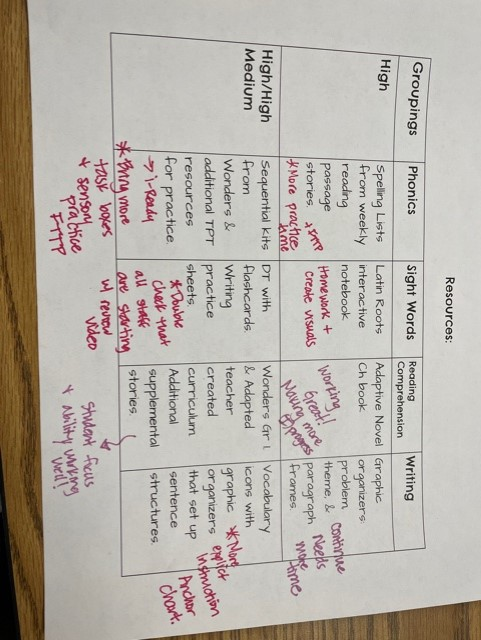
Listing out your current resources helps you to frame that every need is covered.


 The important part is reviewing what is working and what is not.  What could use more attention?  Why?  More interactive lessons?  More practice?  A different program or strategy?  Maybe time needs to be shifted to a particular skill.  Here I have added notes about more intervention time with Fast Track To Phonics, videos, revised anchor charts, homework opportunities, and notes to myself of what is working great (i.e. consistent progress at an appropriate pace). Now, it’s lesson planning time. 


Wishing you and your students AMAZING Spring Growth!!


Like what you read? Join me in upcoming blog posts where I continue to put these strategies into place and share resources!


Tuesday, October 26, 2021

Digging Deeper Into Learning Strategies: Close Reading for Exceptional Learners

 By Heather Pfrunder, M.A.Ed.   SDC Teacher and Education Specialist

October 25, 2021


The written word...oh how I love thee!  I could wax poetic for at least 5 pages on how much I LOVE reading, and even writing!  However, teaching this all encompassing and vital subject had me shaking in my boots as a new teacher.  There is just sooo much to cover.  In fact, my first several years of teaching I merely tested the waters of what I might explore versus really developing deeper strategies.  Upon my third school year teaching, and my first at OMSD, I really began to grow in this area.  However, implementing strategies which include writing to learn seemed daunting to students that barely acquired phonics skills and were challenged to learn vocabulary.   So I went down checklists: What do my students need to learn?  What is required that they have exposure and learn to use strategies comparable to their typical peers -- particularly AVID?  How do I select texts?  So hang tight - because this post has every resource I’ve ever created (and 2 I gathered) for ELA -- all downloadable!


What do my students need to learn? 


  1. A-typical/autistic students require visuals (i.e. pictures) to help them relate the written word to a concept.  This strategy is also helpful for students with cognitive delays or are Language Learners (that covers 100% of my students and probably a few of your students, too).

  2. Repetitive practice to understand the task demand so that they can focus on the actual learning/application of learning.

  3. Simplicity - while a concept can be complex to a degree, the format needs to be not too visually busy.


What Strategies Do I Need to Teach?


From a fundamental standpoint I need to address the following skills, as all reading comprehension rests on the following (and note - I usually teach them in this order):

  1. Wh- Questions

  2. Story Sequence

  3. Story Retelling

  4. Citing Text Evidence

  5. Identifying Themes

  6. Metacognition While Reading


Added to that are specific expectations of how learning should occur: AVID (i.e. column notes/WICOR, RACES, Thinking Maps, Costa’s Levels of Thinking), and of course, our district appointed curriculum: Wonders.


Starting with Wh- Questions, try using a mat to reference Wh- Mat Free Resource

Then break it down: Using a graphic organizer


This one I created. It has the blue shading because most of my students

are also challenged with their handwriting skills.


Story Sequence: For this one I typically start with taking pictures of the story.  Students can reference the book to match the order.  Notice the difference between the two sets of visuals: the one I used earlier in the year also includes the text for students to cite.  As they become more proficient, they are expected to find the words in the actual text:


Notice the Select Your Theme at the bottom? After a passage/story
review, they are given options to identify the type of story and the
change or significance of the story.
                                                                  

Story Telling: I created several versions of this graphic organizer, each version addressing Costa’s Levels of Thinking.  Below is the simple level one thinking.

Yup… I love the “Someone, Wanted, But, So, Then, Finally” format of story retelling.  You pretty much can’t go wrong with simple stories.  For added challenge, students really have to pay attention to time frames in a story if it starts with a “flash-forward.”


Citing Text Evidence:  Joint-attention is challenging enough when you are looking at a book and then worksheet to complete your work.  Add a graphic organizer on the wall to this, and well… who’s lost?  Everyone! Sigh… Solution?  Imbed the expectations right into the worksheet.  Make the worksheet a template and apply, and reapply… over time the concept is learned! Not only are we citing text evidence, but we are also reflecting on the Essential Question that is posed within the Wonders Curriculum.
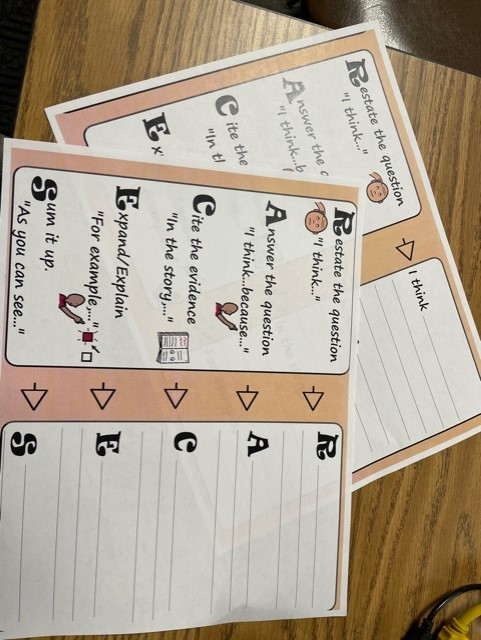


Note: there are two different versions of this RACE and RACES - 

Start with RACE for beginning learners.


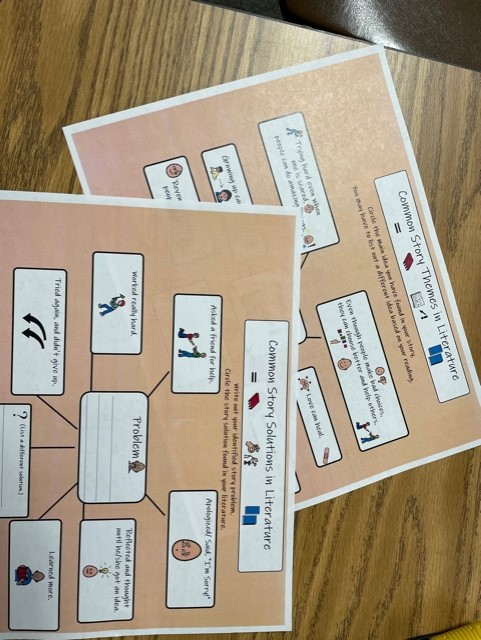
Identifying Themes: This always has me near tears.  Abstract concepts are so hard for my students to connect with!  But then I realized that the solution could be as simple as basic story themes themselves!  Aren’t common themes recycled in most literature?  Especially simple literature?  I started with Thinking Maps about story problems/solutions, and then after this reflection, the Thinking Map for Story themes became a matter of visual connect-the-dots.


Story Problems and Story Themes are laid out into Thinking Maps. 

While Thinking Maps are meant to help students organize their own thoughts,

Modeling with them also has benefits.


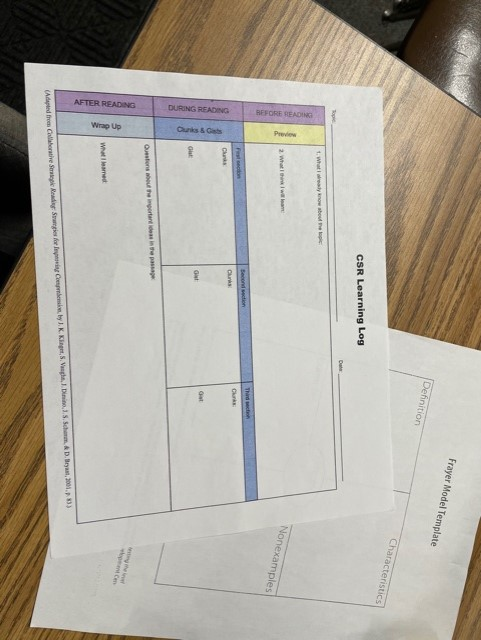
Metacognition While Reading: While all of the previous graphic organizers can address metacognition with additional visuals and check in’s, there is one strategy that made an amazing difference for my more advanced learners, and that is the CSR Learning Model. Of note that the CSR model is not only a reflection of reading comprehension, but done correctly, it is also done in collaboration with a peer.  So think about Kagan strategies in conjunction with this.  CSR stands for: “The Collaborative Strategic Reading (CSR) strategy incorporates cooperative learning, vocabulary development, questioning techniques, opportunities to practice, and students’ use of prior knowledge” (Per: nysrti.org/intervention-tools/reading-tools/tool:csr/).

In its simplest of explanations, students reflect on what they “get” or the “GIST” of a passage/story and what they “don’t get” or the “CLUNK” of the passage/story.  Often, this boils down to vocabulary or word usage.  And for this I like to use the Frayer Model to do a deep dig dive on a per student vocabulary.  What I love about this is that vocabulary learning now becomes not based on teacher assigned work, but student identified need.  By the end of the process/last multiple read students really have looked deeply into what the passage says.  (Of note: while this works for all texts, I really like to begin with non-fiction texts of interest, especially those with more academic words.)


This is a simple graphic organizer with the before, during, and after reflections. 


For more on the CSR model you can explore: https://iris.peabody.vanderbilt.edu/module/csr/cresource/q1/p01/#content


Everything I have shared and More can be downloaded here:

Close Reading Strategies for Diverse Learners


So at this point I have shared a lot of resources and strategies.  Hopefully one or more will help you and your students on the very long road to English proficiency.  While all of these resources are created to exist in conjunction with the texts, often the question lies in which text to pick -- after all the provided resources of Mc-Graw Hill’s Wonders program can seem like an ocean when prep time demands that you select from a more pond-sized selection.


How Do I Select Texts?


For this I am suggesting that selection is either for UA/ELD support or if you are in an SDC setting like myself - you are adjusting based on IEP goals. So here goes the short version at the end of a long blog post!


  1. I actually like the Phonics Readers to begin teaching how to use strategies.  The simple text helps students focus on the main points.

  2. From there I go to the Anthology texts using the above shared graphic organizers.  I focus on main events and new vocabulary. I typically begin each story with a short video clip to introduce the topic and/or vocabulary slides.

  3. From there I go into using the Close Reading Companion (Grade 1-2) or Wonderworks (Grades 2- and beyond): story selections are vocabulary rich, with visuals, and tend to be slightly shorter than the Anthology.  I shift to this resource because the embedded questions on the page are much easier to navigate but are also complex enough to challenge and expand their understanding beyond the initial graphic organizers I have shared. Additionally, students can underline not only the work cited, but the key words in the questions being asked.


Over the years I have used supplemental resources (as found on teacherspayteachers.com) or programs like “Read Naturally,” but the idea is that students have access to high quality texts and are commensurate to their typically developing peers.  In this, adapting strategies to work in conjunction with the Wonders curriculum not only meets the unique needs of the students, but allows them access to the general education curriculum.


Like what you read?  Join me in upcoming blog posts where I continue to put these strategies into place and share resources!


Tuesday, September 21, 2021

The Mega Task Demand: Metacognition...Oh, We are Thinking About Thinking, I Think…

 By Heather Pfrunder, M.A.Ed.   SDC Teacher and Education Specialist

September 20, 2021


It’s a mantra in my SDC classroom where I am verbally redirecting students on how to work attentively: “looking eyes, listening ears, eyes on paper, moving pencil on paper, thinking about your work,...no, try first then I can help you”...and repeat. And repeat.  I should auto-record myself, make a playlist, and hit the numbered response.  Ew, that last thought was not so stellar. But hey, in my humanness, it snuck in there.  And if you have ever taught students with metacognition challenges maybe you, too, have winced over such a thought.  So, I must ask myself: Am I really teaching thinking about thinking?  When I started this article, I was pretty sure the answer was, “Yes!  Graphic organizers and I are friends!” I can do amazing things with BoardMaker!” [For my Gen Ed teacher friends, this is a program where you create learning tools with picture icons matched with words for visual learners]. But here’s the thing about writing, you really have to research and self-reflect.  So, I’ve come face-to-face with this large mental image of a K-W-L chart.  So let’s break it down:


What we know is that metacognition in its simplest form is simply an “awareness or analysis of one's own learning or thinking processes”  (thank you Merriam-Webster).  For students with sensory processing issues, I find that often they want to focus on their own little inner worlds to find that slice of happiness, bringing them back to the uncomfortable reality of learning challenges can feel like stopping a tsunami from the shoreline.  


What we want to know is how to make this relevant for our a-typical students. 


What I learned is:

 1.) “Assign explicit instruction that addresses not just what you are learning, but how you are learning.” 

However, applying it to a lesson for an a-typical learner, often this means a visual model, a check-list of expectations, and repeat practice. Which is great (and essential for many of our visual learners with cognitive delays), but it may not be self-reflective. Instead what we often find is cognitively passive behaviors: “I counted the dots (TouchMath) and wrote the answer, I earned my tokens (my class reward system), got my i-Pad time (SDC earned time with a favorite item - the i-Pad)…”  So often it feels like a compliance check -- not actual thinking about thinking.  Learning this way is gradual, but for our non-verbal learners visual checklists of looking between the cue and the task is not merely to complete the task, but to “regulate performance and verify accuracy” through “self-monitoring” and to “signal task completion.” (Richie, G. 2005). So to be effective metacognition tools our lists cannot just be generalities, but more specific with careful thought about the actual thought process required to learn a task.


This is one of my more general in-task directions for functional skills.  

Relevant, but not specific to meta-cognition.


2.) They must be taught the concept and its language explicitly.”

This, I believe, is the golden ticket.  If it is connected to previous skills and taught over time

we can get students thinking about what they understood or didn’t.  Not just a simple exit ticket,

but “What did I understand?” and “What doesn’t make sense?”  


Examples of this:

  • “I answered the question by finding the key words in the question and underlining my text evidence”

  • “I decoded while reading”

  • “I recognized story sequence”

  • “I counted all”

  • “I regrouped”


Yup, those “I Can…” statements attached to those state standards.  However, we explicitly reflect “I did” or “I did NOT” understand.  Now we have active participants in the meta-cognition process.


When I go back into my previous check lists, they are still pretty relevant for functional skills.  However, I am looking forward to continuing on looking at objectives and having my students exit by answering self-reflection learning questions (for that last token on their token boards).  And rather than reinvent the wheel, I am going to initially have my students reference the anchor charts at my centers to reflect on their learning. 


This is a how-to process visual, but not totally self-reflective. 
I will have to add a process to this.


This is great for setting expectations, but not specific meta-cognition.


This is much better for explicitly teaching the learning process!


This anchor chart has the thinking process and the self-reflection embedded into it.


 I am looking to really celebrate learning!  And just maybe, it will be my students sayinglooking eyes, listening ears, eyes on paper, moving pencil on paper, thinking about my work, try it first…”


********************************


Join me in upcoming blog posts where I put these strategies into place and share resources!


References:


Chick, N. (2013). Metacognition. Vanderbilt University Center for Teaching. Retrieved 9/20/2021 from https://cft.vanderbilt.edu/guides-sub-pages/metacognition/.


Richie, G. (2005). Two Interventions that enhance the metacognition of students with disabilities: Cognitive Cue Cards and Correspondence Training.  Retrieved from: https://files.eric.ed.gov/fulltext/EJ914572.pdf


Wednesday, January 29, 2020

What Might GATE Look Like for Our Students? Andrea Thune

What Might Gifted and Talented Education Look Like?

Photo by Noah Näf on Unsplash


While classrooms with gifted students share many best practices and powerful learning environments that should be in every school, there are some characteristics specific to Ontario-Montclair GATE classrooms.


"There's no time in teaching when "just telling" is enough. The key to quality teaching is explaining." ~Douglas Fisher & Nancy Frey

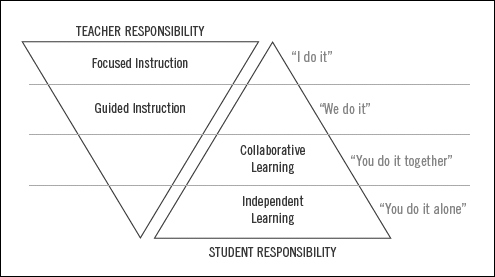
As a teacher with gifted students in my classroom, one of my main concerns was providing them with an environment challenging enough to keep all of us focused and engaged in our learning. Through experience, I quickly learned if I was engaged and challenged in our learning, then so were my students. I really had to let go of being the one in the classroom with all the answers. Amazing things happened when I did not have the answers. If we were going to get to the learning we all wanted to occur; then students had to take ownership. I later learned about Stiggins' evidenced-based strategy and the value of Gradual Release. We shared responsibility.

"Our job is to create rooms filled with students' voices. Not be the main voice." ~Pernille Ripp

There are strategies in theory and strategies in practice.

The balance we must maintain as practitioners is between theory and strategy. Merely copying a strategy I saw used in my friends' classroom isn't going to honestly give me the impact I hope to have on the learning in my class, and neither is only reading about it. An excellent place to start is with Dr. Sandra Kaplan's Thinking Prompts. I would encourage you to watch this brief video to understand the theory behind this strategy.  Click here for additional videos.
A second area to focus upon is Universal Themes and Generalizations. To hear about this theory and see the strategy in action, watch this 10-minute video.

Want to learn more? We've created a one-page document of strategies to look for in our GATE classrooms. To connect theory to practice, how about joining our team on a Spotlight visit to explore what instruction looks like for our OMSD GATE students?

I would encourage you to connect with other educators and continue learning about best practices for differentiation for our GATE students.

Happy Learning,
Andrea Thune


Thursday, October 31, 2019

Genius Hour-Independent Study


When I was GATE trained, we were taught an engagement strategy called Independent Study, also known as Genius Hour.  The students choose what topic they are going to educate themselves on, and the teacher guides and facilitates their learning. Facilitating learning was a very new concept to me because, as a teacher, I always thought that I was to be the person who delivered the information to students, not the guide. A couple of my colleagues talked about how they were using the strategy in their classrooms, so I decided to give it a try with the GATE clustered classes. 

            When I initially tried Genius Hour, I let students pick whatever topic they wanted, had them research, and present. Some of the students would do a good job, but others were not producing the highest quality of work. This year, with a little more research, I found a way to help the students give more focus so that they are getting what they needed out of the independent study. I found a great resource on Teachers Pay Teachers that will guide students through the process as well as keep them accountable.  

Building a Wordle

   The Wordle will allow students to brainstorm their interests, and a way to help them choose their focus. They will be able to see all of the people and activities that interest them. For our district, the website Wordle does not work on school computers, but I did find an alternative through Google Apps Add-ons. The Add-On is called Word Cloud Generator. Here is an example that I made and will be showing my students.  

Brainstorming

Next, the students will decide what topic with a specific question they would like to learn more about. I will allow the students to use the computers to do some research on
 different areas of interest. During this time, I talk to the students about credible websites, such as .edu, .org, .net, and .com. In addition, if a website has an author attached to the article, that is always a good sign. TED is also a great place to find information, and it is nice because it allows the students to use different types of resources for their research. I feel that teaching the students how to research is so important, especially in technology-driven learning environments.  


Monitoring Progress

In the past, I believe this is where I fell short, so I am going to build in meeting times once-twice a week. I want to make sure that students are progressing on their learning and offer up any support that they may need. First, the students use the KWHLAQ chart once they have a question. This is a new step for me, but I believe this will help students see where they need to go with their research. It will also allow them to ask the right questions when using computers. 
After completing the KWHLAQ chart, they are ready to propose their questions.  Just another step added to ensure students are supported throughout the process and making sure they are being guided in their learning.  
            Once the students are officially researching their questions, I want to make sure they are logging their findings. After each research session, students must fill out their log, which will include their websites and what they learned. This step will especially be important because it will show me if they truly understand what they are reading and if it enhances their learning. I will have them do this on a Google Doc so that they can hyperlink the web addresses.  

The Final Product

            The final product will be entirely up to them, as long as it can be presented to the class. In the past, many students felt the most comfortable with a Google Slides presentation or a video. Which is fine, but I want them to find different ways to show information. Promoting creativity is so important. We will have a conversation on different modes of informing an audience.  As a group, we will then create a Choice Board so that the students will have access to the list of ideas. 

            How am I going to incorporate this into an already packed schedule? I thought UA (Universal Access) might be the best place for Genius Hour. Independent learning is perfect for GATE students, and it is an exciting way to challenge them.  Genius Hour can be altered in many different ways to fit your classroom environment and students. 


Diana Eberle


Most Viewed Posts