By Heather Pfrunder, M.A.Ed. SDC Teacher and Education Specialist
October 25, 2021
The written word...oh how I love thee! I could wax poetic for at least 5 pages on how much I LOVE reading, and even writing! However, teaching this all encompassing and vital subject had me shaking in my boots as a new teacher. There is just sooo much to cover. In fact, my first several years of teaching I merely tested the waters of what I might explore versus really developing deeper strategies. Upon my third school year teaching, and my first at OMSD, I really began to grow in this area. However, implementing strategies which include writing to learn seemed daunting to students that barely acquired phonics skills and were challenged to learn vocabulary. So I went down checklists: What do my students need to learn? What is required that they have exposure and learn to use strategies comparable to their typical peers -- particularly AVID? How do I select texts? So hang tight - because this post has every resource I’ve ever created (and 2 I gathered) for ELA -- all downloadable!
What do my students need to learn?
A-typical/autistic students require visuals (i.e. pictures) to help them relate the written word to a concept. This strategy is also helpful for students with cognitive delays or are Language Learners (that covers 100% of my students and probably a few of your students, too).
Repetitive practice to understand the task demand so that they can focus on the actual learning/application of learning.
Simplicity - while a concept can be complex to a degree, the format needs to be not too visually busy.
What Strategies Do I Need to Teach?
From a fundamental standpoint I need to address the following skills, as all reading comprehension rests on the following (and note - I usually teach them in this order):
Wh- Questions
Story Sequence
Story Retelling
Citing Text Evidence
Identifying Themes
Metacognition While Reading
Added to that are specific expectations of how learning should occur: AVID (i.e. column notes/WICOR, RACES, Thinking Maps, Costa’s Levels of Thinking), and of course, our district appointed curriculum: Wonders.
Starting with Wh- Questions, try using a mat to reference Wh- Mat Free Resource
Then break it down: Using a graphic organizer

This one I created. It has the blue shading because most of my students
are also challenged with their handwriting skills.
Story Sequence: For this one I typically start with taking pictures of the story. Students can reference the book to match the order. Notice the difference between the two sets of visuals: the one I used earlier in the year also includes the text for students to cite. As they become more proficient, they are expected to find the words in the actual text:

Story Telling: I created several versions of this graphic organizer, each version addressing Costa’s Levels of Thinking. Below is the simple level one thinking.

Yup… I love the “Someone, Wanted, But, So, Then, Finally” format of story retelling. You pretty much can’t go wrong with simple stories. For added challenge, students really have to pay attention to time frames in a story if it starts with a “flash-forward.”
Citing Text Evidence: Joint-attention is challenging enough when you are looking at a book and then worksheet to complete your work. Add a graphic organizer on the wall to this, and well… who’s lost? Everyone! Sigh… Solution? Imbed the expectations right into the worksheet. Make the worksheet a template and apply, and reapply… over time the concept is learned! Not only are we citing text evidence, but we are also reflecting on the Essential Question that is posed within the Wonders Curriculum.
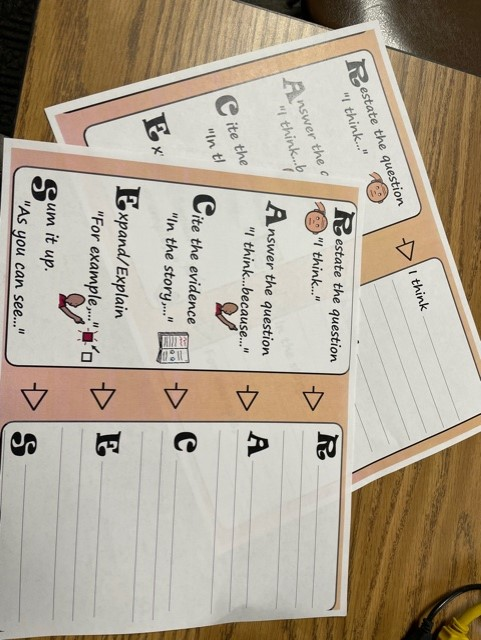
Note: there are two different versions of this RACE and RACES -
Start with RACE for beginning learners.
Identifying Themes: This always has me near tears. Abstract concepts are so hard for my students to connect with! But then I realized that the solution could be as simple as basic story themes themselves! Aren’t common themes recycled in most literature? Especially simple literature? I started with Thinking Maps about story problems/solutions, and then after this reflection, the Thinking Map for Story themes became a matter of visual connect-the-dots.
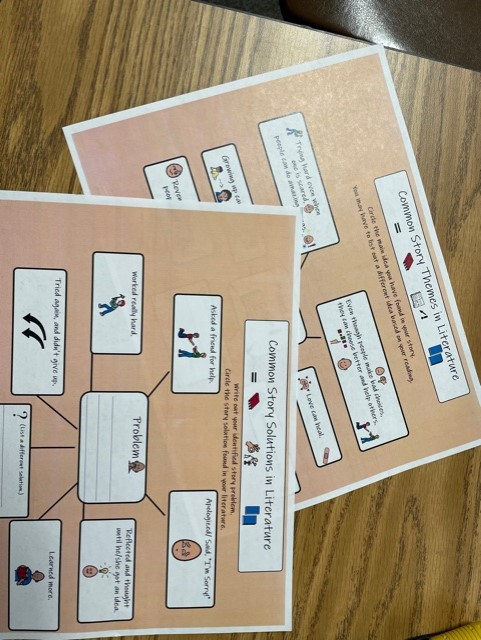
Story Problems and Story Themes are laid out into Thinking Maps.
While Thinking Maps are meant to help students organize their own thoughts,
Modeling with them also has benefits.
Metacognition While Reading: While all of the previous graphic organizers can address metacognition with additional visuals and check in’s, there is one strategy that made an amazing difference for my more advanced learners, and that is the CSR Learning Model. Of note that the CSR model is not only a reflection of reading comprehension, but done correctly, it is also done in collaboration with a peer. So think about Kagan strategies in conjunction with this. CSR stands for: “The Collaborative Strategic Reading (CSR) strategy incorporates cooperative learning, vocabulary development, questioning techniques, opportunities to practice, and students’ use of prior knowledge” (Per: nysrti.org/intervention-tools/reading-tools/tool:csr/).
In its simplest of explanations, students reflect on what they “get” or the “GIST” of a passage/story and what they “don’t get” or the “CLUNK” of the passage/story. Often, this boils down to vocabulary or word usage. And for this I like to use the Frayer Model to do a deep dig dive on a per student vocabulary. What I love about this is that vocabulary learning now becomes not based on teacher assigned work, but student identified need. By the end of the process/last multiple read students really have looked deeply into what the passage says. (Of note: while this works for all texts, I really like to begin with non-fiction texts of interest, especially those with more academic words.)
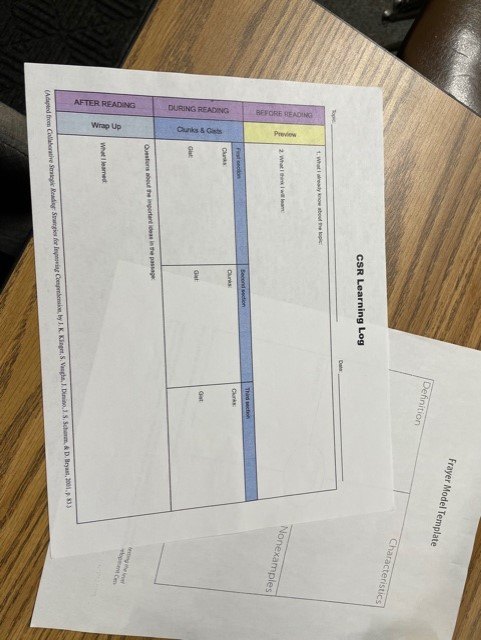
This is a simple graphic organizer with the before, during, and after reflections.
For more on the CSR model you can explore: https://iris.peabody.vanderbilt.edu/module/csr/cresource/q1/p01/#content
Everything I have shared and More can be downloaded here:
Close Reading Strategies for Diverse Learners
So at this point I have shared a lot of resources and strategies. Hopefully one or more will help you and your students on the very long road to English proficiency. While all of these resources are created to exist in conjunction with the texts, often the question lies in which text to pick -- after all the provided resources of Mc-Graw Hill’s Wonders program can seem like an ocean when prep time demands that you select from a more pond-sized selection.
How Do I Select Texts?
For this I am suggesting that selection is either for UA/ELD support or if you are in an SDC setting like myself - you are adjusting based on IEP goals. So here goes the short version at the end of a long blog post!
I actually like the Phonics Readers to begin teaching how to use strategies. The simple text helps students focus on the main points.
From there I go to the Anthology texts using the above shared graphic organizers. I focus on main events and new vocabulary. I typically begin each story with a short video clip to introduce the topic and/or vocabulary slides.
From there I go into using the Close Reading Companion (Grade 1-2) or Wonderworks (Grades 2- and beyond): story selections are vocabulary rich, with visuals, and tend to be slightly shorter than the Anthology. I shift to this resource because the embedded questions on the page are much easier to navigate but are also complex enough to challenge and expand their understanding beyond the initial graphic organizers I have shared. Additionally, students can underline not only the work cited, but the key words in the questions being asked.
Over the years I have used supplemental resources (as found on teacherspayteachers.com) or programs like “Read Naturally,” but the idea is that students have access to high quality texts and are commensurate to their typically developing peers. In this, adapting strategies to work in conjunction with the Wonders curriculum not only meets the unique needs of the students, but allows them access to the general education curriculum.
Like what you read? Join me in upcoming blog posts where I continue to put these strategies into place and share resources!