Showing posts with label grade 4. Show all posts

Wednesday, September 19, 2018

Teachers Need Other Teachers

        Teachers Need Other Teachers

Image result for teamwork pictures
Have you ever made a decision and then thought to yourself… “Why did I just do that?” I have had many moments like this and just in May I had decided I was going to leave the Spotlight Team to go back to school to get my BCLAD. My heart was set on it, informed the directors of my decision, and I was ready to start a new chapter in my life. As I went home, after making my decision, I began to have mixed feelings. I wanted to go back to school, but not because a BCLAD was a certification I had been wanting, more so because I wanted the extra money in my paycheck with the educational units added to my degree. As I sat in my home waiting for my husband and daughters to get home, I knew I didn’t want to miss out on any special events at school, I wanted to be at the sports/dance events that my daughters would participate in, and I wanted to be there for my husband as he coached another year of High School wrestling.

Together we make a BIG difference!

As my heart beat a little more each time and my mind was putting my priorities in order, I also realized I didn’t want to leave a great group of teachers that I had begun to know and work with. At El Camino, I have wonderful colleagues that are there to comfort and help in any situation and now I had gone beyond my school boundaries and found district colleagues that would also be there to inspire me along my teaching journey. I pictured Lola Jollie’s smile and words that always brought warmth to my heart, I thought about meeting Gus Macuil and Kimberly Reza; their laughter and discussion for teaching truly inspired me and lit the flame, to my passion, a little brighter.

“Coming together is a beginning. 
Keeping together is progress. 
Working together is success."
~Henry Ford

My priorities quickly became clear… God is and always will be first in my life as He makes way for all things good that come from Him. My Family comes next; they are my heart and soul, the ones that keep that smile on my face, even when I’m down. Then comes Teaching; my dream and passion to help kids realize they are the key to change in the future. Interestingly enough, as I began teaching I met the best of friends that are still there for me in an instant. From them, I learned that it’s important to have amazing and positive colleagues to collaborate with. As we put our skills to work, sharing job responsibilities, and focused on the professional objective we soon realized healthy relationships were building; the stronger the relationship, the stronger the teamwork and the more effective we became.
So here I am again on the Spotlight Team. I have a great class. I see some obstacles ahead and things may be a mess at times, but because of this wonderful team I can honestly say that I have sunshine on rainy days, I have laughter when my joy is gone, and I have hope when I think all is lost. We need each other and I hope more of you OMSD shining stars get to know this amazing Spotlight Team that is not perfect by any means, we are just here opening our doors to collaborate and remind you that you are not alone… our goal is to help one another create positive learning environments for our students.

Live, Love, Teach,
Hilda Sanchez



Going Digital . . . Setting Goals and Starting Small

Going Digital . . . Setting Goals and
Starting Small


Last March I was lucky enough to attend the Spring CUE Conference
in Palm Springs with a few fellow educators from my school site.  I was
really looking forward to learning new and innovative ways to incorporate
technology into my classroom. Wow, what a dizzying couple of days! I
definitely came back from the conference with my mind filled with
wonderful new ideas about using digital tools with my students.  Despite
all the excitement from the conference, just a few days later, I found
myself back in the same routines that I had been in before heading to
the desert. While some of the things I learned were easy to start right
away in my classroom, there were a lot of good ideas that got put on
the back burner.  I simply categorized them as “these would be great to
use next year,” and “I have all summer to work on that.”

So here we are, well over a month into the new school year and all that
summer prepping never quite happened. Who was I kidding anyway?
Over the summer I got married, went on a fabulous 3-week honeymoon,
and moved into a new home with my husband.  Disappointed in myself, I
decided to look back on my notes from that conference and pick a few
strategies that I could easily start using in my classroom within the next
month. There were a lot of great ideas in my head, but two really stuck
out to me; #BookSnaps and Interactive Digital Notebooks.


Stay focused, go after your dreams and
keep moving toward your goals.
- LL Cool J


#BookSnaps


For me, #BookSnaps was the easiest of the two digital tools to start
using with my students.  The idea of #BookSnaps is to create a digital
and visual way for students to express what they have learned from the
text.  They can be used with any text and really help students to make
meaningful connections with what they are reading.  While the idea comes
from using the Snapchat app, the process can also be done using Pic
Collage, Seesaw, Google Drawings, and Google Slides.  Depending on
what types of devices your students have access to, and the grade you
teach you might find one platform will work better for you than others.  I
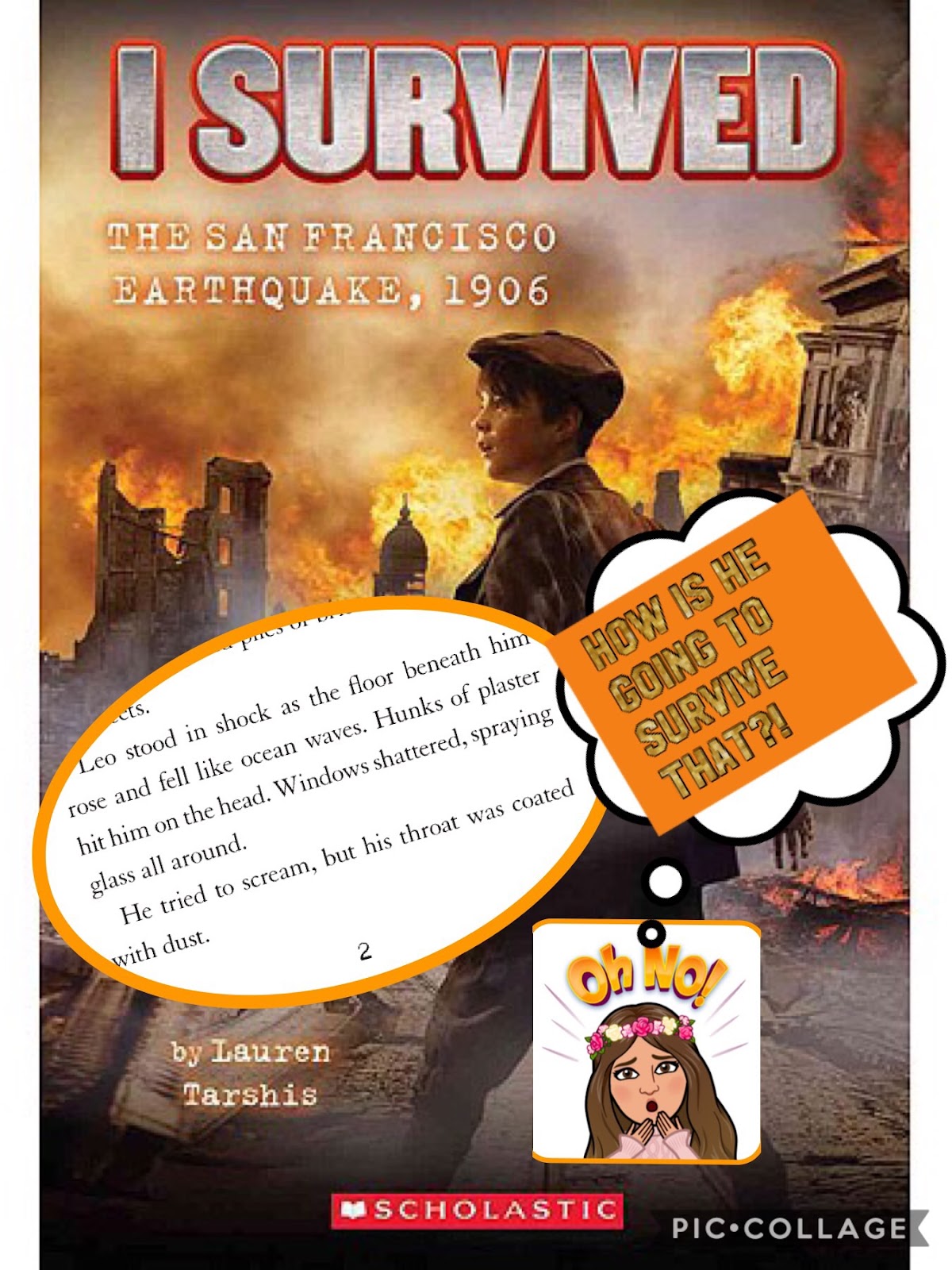
used Pic Collage to create the #BookSnap pictured above. My
students are using Google Slides on their iPads. #BookSnaps were first
started by Tara M. Martin and you can check out what she has to
say about them here.

www.tarammartin.com/resources/booksnaps-how-to-videos/  

Her website gives student examples as well as how-to videos for many
of the platforms listed above.  

Every #BookSnap should include:
  • A picture of the book cover
  • The Author's name
  • A picture of text you want to annotate
  • Annotation
They can also include:
  • emojis
  • Bitmojis
  • hashtags


Digital Interactive Notebooks


Interactive Notebooks have always been a part of my teaching.  
Students really enjoy them and they are a great way to showcase
student learning.   The downfall of Interactive Notebooks for me is the
time spent on cutting and gluing everything in them, not to mention the
inevitable mess they can create.  Why not make them digital?
Creating a Digital Interactive Notebook can require a significant
amount of prep time, but saves me time on the other end. Less
instructional time is lost. So where do you begin? Here are a few
suggestions to get started.

  • Set up your notebook in Google Slide
  • Create a cover slide and table of content.
  • Choose your format. For example the left side of your slide is
teacher input and the right side is for student output.
  • Be creative, there are so many different digital tools you can include in your Interactive Notebooks
  • Share with students using Google Classroom.
  • Be sure to make a copy for each student in Google Classroom so that students can edit.


Learning about new digital tools for the classroom is always fun for me. The hard part is actually trying some of these ideas out with my students. Start small, try one tool at a time. Don't be too hard on yourself if it does work out at first. There is always a learning curve.


Learning and Teaching with Grace,

Alina

Sunday, September 2, 2018

I Know What You Did Last Summer....(a non-horror experience)


When I think of summer, I think of time off especially after an arduous year of teaching, learning, reflecting, grading, writing (lesson plans), reading, and all things academic.  So it was to my surprise that I signed up for the Invitational Summer Institute (ISI).

Image result for reluctant writersI bet your gut reaction was "Whaaat!!  Summer writing, no thanks!  MAYBE summer reading, anything but writing!"

No worries, I felt the same way.  People will do anything to avoid writing...like a horror movie it scares, frightens, worries, terrorizes and perhaps makes us sweat (a little).  I get it.  I get it.  I. Get. It!  I used to feel that way too.

Then, something changed.  A shift if you will.  Let me tell you what I did last summer.

It started with me, reluctantly (to be honest), applying and getting accepted to attend the 2018 Invitational Summer Institute (ISI) held at UC Riverside from mid-June to early July 2018.  Twelve days total.  I was unsure if I wanted to spend two weeks of my summer like this but I decided that my writing instruction needed some assistance and a fellow colleague REALLY encouraged me to attend (if you are reading this, you know who YOU are!).

Image result for transformationParticipating in ISI changed how I viewed writing and how I could make writing more meaningful for students.  I also realized that the ISI was NOT  a writing workshop with hand-outs and a mountain of strategies that you probably will never use anyway.  Don't get me wrong...there were actual hand-outs and strategies that were shared but the main takeaway for me was that writing takes many forms and accomplished writers NEED accomplished writer teachers with an emphasis on the teacher being a writer themselves and not just teachers of writing.

What does this mean exactly?  Well, by experiencing each day during the ISI as a writing "student," I realized that the reasons to write were crucial for engagement and to stimulate creativity.  Through thoughtful and carefully-planned activities, we became poets, storytellers, reporters, authors, rappers, lyrical composers, researchers, and audience members to an array of creative writing pieces.  We clapped, cheered, and encouraged each other.  We became a community of..........writers.

Writers.

Therefore, my "story" for this year's Spotlight Blog will be about writing.  I would like to share with you how the ISI has impacted my classroom practice.  I have implemented some ISI writing experiences with my current class and I am excited to share the results with you in future blogs so please return!


Want more info?  Click here:

Would you care for a "preview" - like a movie trailer showing some of the fabulous activities we participated in during the ISI?  Well, there is an annual writing conference coming up on Nov. 3rd at UCR.  There is a fee.  If your site has PD funding, this would be a great way to use it.  I hope you can join us!


Happy Writing!
Gus Macuil


Thursday, April 26, 2018

Conferencing with Students = Communicating with Parents (part 3)


Conferencing with Students =
Communicating with Parents (part 3)

    What a difference a school year makes!  Remember the first week of August when you received your students entering the classroom for the first time?  Questions swirled around your head:  Will I be an effective teacher?  Will they LOVE learning in my classroom?  Can I build their character, self-esteem, and confidence?  What will be my challenges?  Well – we find ourselves at that time of year to “wrap it up” and we feel excited as we reflect on the outcomes.  Do our students think or feel the same way?

Teachers reflect all the time!  So how can I produce reflective students?

          As you have noticed if you’ve read my previous posts, I have focused on conferencing with students in order to facilitate student reflection and then share this  with parents.  I have used familiar tools/resources such as Renaissance Learning (Accelerated Reader) since these provide quick reports that can be used in a student conferencing session.  At our school site, our wonderful principal has created a Principal’s "Challenge" in which each grade level is challenged to gain a certain amount of reading points (through computer quizzes).  These challenges are six-weeks in length.  Incentives include an extra recess, student brag tags and an end-of-year celebration.

          This week I ran a report that informs my students their total reading points for each Principal’s Challenge.  I gave each student their personal slip in order to reflect on their reading motivation throughout the year.  Here is a picture of what this report looks like:


          Next, I used this free website  https://nces.ed.gov/nceskids/createagraph/  to generate a blank graph template for students to chart their data and to set a goal for the remaining Principal’s Challenge (challenge #6).  Finally, they had to write a statement about why they chose this goal.  I made sure to make no judgments about whether their goal was too low or too high.  I left it to their discretion and overall the majority selected goals that were reasonable.  Here is an example:


          It was interesting to me that this particular student wrote: “I want this goal (30 points) because I want to get more points than any principal’s challenge points I ever had.”  It warms my heart when I read these introspective conclusions that students come to and it also motivates me to continually find other ways to facilitate goal-setting.  Of course, students take these home in order to share with their parents how they plan to keep improving their reading habits.

Student reflections will undoubtedly lead to teacher reflection.


          After I read through each reflection and goal-setting analysis, I thought about how I could help students become more voracious readers and whether goal-setting more often can help in this endeavor.  I did observe an overall trend of point decline especially after the third Principal’s Challenge.  This challenge comes right after the Winter Break and I am assuming students return from break still holding onto a “vacation” mentality especially when it comes to reading.  I am thinking of ways to  incentivize  next year’s students after this break perhaps setting goals right away after the break and more frequent progress monitoring such as reading log check-ins or offering a teacher-student lunch bunch for those students who take weekly quizzes.   

          I hope you have enjoyed these morsels of information and a small “peek” into my classroom regarding student conferencing.  May you enjoy your summer vacation and we will see you next school year!


Learning and growing along with my students!
Gus Macuil


Monday, March 5, 2018

Universal Access (part 2)


Universal Access (part 2)


Have you ever wondered how to differentiate reading in your classroom? Have you wanted to help your struggling readers and help your proficient readers dive into deeper thinking?  You can! If you read my blog last month, you learned about my Language Arts Universal Access and how I group my scholars with SUCH different needs in order for them to achieve success in reading and writing. Now, as teachers, we are continuously looking at numbers for success, but I look at success as overcoming obstacles that have prohibited one from achieving a goal. To reinforce the idea of positivity and motivation getting us to where we never imagined, students watch videos and read stories of leaders and celebrities overcoming obstacles.

When students focus on the positive,
the NOW and ALL they have accomplished,
you get them to realize they ARE smart and can achieve what they set their mind to.

The goal of my Universal Access Time is to target the different areas and different pace due to different academic needs. The goal would be GREAT to have all Proficient/Advanced students and be able to form our groups according to the Multiple Intelligences, but it’s not likely. Therefore we celebrate the small steps, the daily effort that is leading us towards success and adds activities/lessons to also target the Multiple Intelligences. Student BUY-IN (students have to know the answer to the question, “What’s in it for me?”) leads to independent learners., but the key to continued success is keeping them engaged within their team when you are not there to support. Have them come to an agreement with a team name and draw/write the talent/strength he/she can bring to their team.
In order to keep them engaged, I keep them on track with team roles. Since I am not there to support every team on a daily basis, students know to choose a leader, writer, time-keeper, and the rest are responsible for being collaborative workers that can add to their team as they see fit necessary (this all comes from the teaching of “The Importance of Teamwork” which I have previously talked about in my blogs). Once they have the responsibility, the teams will function without your assistance); for the most part, the students will read their directions and just roll with it. Now, it’s not to say that you won’t have to revisit norms and responsibilities because it’s always good to teach at the beginning of every trimester, to give students a new and refreshed perspective when working in a team.


As you get ready to set up your Universal Access, look at numbers initially to form your teams. Form homogenous groups, meaning you focus on Diagnostic/Placement and  Scholastic Reading Inventory to know who your readers are: Far-Below Basic, Below Basic, Basic, and Proficient/Advanced. I usually have 25-30 students; therefore end up with 4-5 groups. I keep my Far-Below Basic and Below Basic groups, the smallest, 5-7 students, my Basic group will have 7-8 students, and my Proficient/Advanced group will have approximately 10 students (but you can split this team into two if it suits best). Keep in mind, after setting up your groups/teams, let your students know that they are fluid; groups can and should change due to progress.

That's at the core of equity: understanding who your kids are and how to meet their needs. You are still focused on outcomes, but the path to get there may not be the same for each one. ~Pedro Noguera

Once it’s all said and done, don’t go above and beyond on recreating what’s already there. Wonders McGraw Hill has many resources for our use! I have four groups this year:
Teacher Group
Technology Group
Fluency Group
Writing Group
The Teacher Group is meeting time with ME. We read and discuss the Wonders Leveled Readers. For my struggling readers, I always start with a 5-10 minutes Phonics review, running the Spelling Cards and focusing on segmenting and blending a couple of words that have our spelling focus of the week. We then focus on Sight Words, 5 minutes of rapid automaticity naming words that don’t follow Phonics and Decoding rules.

The Technology Group works on Wonders Grammar Games. The Fluency Group focuses on the fluency passage of the week, found in the Student Practice Book. The Writing Group focuses on the RACES strategy answering the Essential Question of the week; students use their student book and Anthology to find evidence in supporting their answer.
My Proficient/Advanced group works on all of this, but I also challenge them by reading a chapter book together that will lead to deeper discussions and the writing of poetry or story skits. Universal Access is an hour of our learning day; the first half hour of Mondays/Tuesdays is dedicated to my Far-Below Group and the second half hour is dedicated to my Below Basic Group.  By Wednesday and Thursday, we have read the Leveled Reader twice and are ready to do the 3rd read without my support. I leave them to read and take notes to form a summary of the book. This gives me time on Thursday/ Friday to meet up with my Basic and Proficient/Advanced groups to check on their progress and know if they need my assistance in any area. It’s not a perfect setting because things will go wrong, but I can say that my students have gained an interest in reading and writing. The interest has led to LOVE for some, and that LOVE has led to academic growth.


Live, Love, TEACH!
Hilda Sanchez


Friday, February 23, 2018

We Are AVID Learners!

We Are AVID Learners!

AVID: Advancement Via Individual Determination.  AVID is a school-wide program that helps students be better prepared and ready for college, thus providing them with tools to be successful in school throughout their journey.  However, you do not need to be an AVID school to provide your students with some of these successful strategies. AVID teaches students how to take and use notes, how to ask and answer questions about a text, and includes many strategies that teach students how to think and interact with one another at a higher level such as through a Socratic Seminar and Philosophical chairs (see my previous blog post).  Today, however, I am going to share a few simple strategies with you that you can start implementing in your classroom right away!

Using AVID’s instructional tools will help your students succeed not only by becoming more organized and responsible, but their reading comprehension and ability to think about a text will also increase across subjects. Every teacher and student will benefit from implementing these strategies!


At this point in the year, my students are completely able to read a text and take notes on their own without me telling them how to set up their notes or what to put in them.  They also are able to write levels of questions completely independently and often do so without even being prompted when reading a text.  It’s such an awesome feeling to see them doing these things all on their own!❤

Below you will see my students sharing in partners the leveled questions they created,(here they are doing this through the Kagan Stand-Up-Hand-Up-Pair-Up strategy).  Next you will see they are discussing and answering their leveled questions in their collaborative conversation groups.  At the end of the video, I have included some samples of student work and also some of my anchor charts on Note-Taking and Levels of Questions.


Teaching students how to ask and answer different levels of questions, and take notes in an organized and useful manner is the first place to start in order to aid in student success and achievement! 

Note-taking is based on the Cornell Note-taking system, where your notes are divided into 2 or 3 columns.  2 and 3 column notes are being done even with TK and Kindergartners at my school! I generally structure the “heading” titles for the notes based on the Reading Comprehension skills we are focusing on for that story or text (ie: main idea/details, details/author’s viewpoint, etc). In the video above you can see numerous examples of the different ways I have done 2 and 3 column notes with my 4th and 5th graders this year.  In the beginning, it’s a slow process to teach them how to structure and set up the notes, but once they get it down it becomes like a second nature for them!

Costa’s Levels of questioning and thinking includes 3 different levels. This is how I teach it to the kids:

Level 1: This is a “right there answer.” You have to be able to put your finger on the answer in the text.  For example, “What is the boy’s name?” 

Level 2: These are harder questions both to ask and answer.  Level 2 questions are generally inference based, drawing conclusions, the author’s viewpoint types of questions.  They generally ask to compare or contrast characters, ideas or events.  They can also ask to “explain how” or “ explain why” something occurred in the story.  The students are taught that they will need to find clues in the text in order to answer the question, but they will not be able to explicitly find the answer.

Copy of pic- Megan Brown.jpgLevel 3: I teach the kids that this is the “selfish question” because it’s all about “me.” Level 3 questions often have the reader imagining themselves in the situation, or the character’s shoes and thinking about what they would do, how they would feel, etc.  Level 3 questions often start like “imagine if you were…..” or “predict what would happen if you…” Level 3 questions can also include summarizing a text and making predictions.
Collaboratively Learning,
Megan Brown


Most Viewed Posts