Showing posts with label Seesaw. Show all posts

Thursday, January 21, 2021

Enhancing Student Engagement with Seesaw

Keeping students engaged during virtual teaching has been a challenge! As a teacher, I am searching for ways to engage my students and check for understanding. One tool I have used from day one is the Seesaw app. While pencil and paper activities are important, they can be tough to monitor virtually. How do we know what students are writing? How can we truly know they have the skills if we cannot see them? The same goes for choral reading. Listening to a class choral read virtually is tough. We need to hear them read independently daily without having to assess them each individually. Seesaw has improved my student engagement by making tasks accessible to ALL learners; the benefits are fantastic.

Today I'm going to share an engagement resource with you that has made my life so much easier. 
Seesaw!

What is Seesaw?

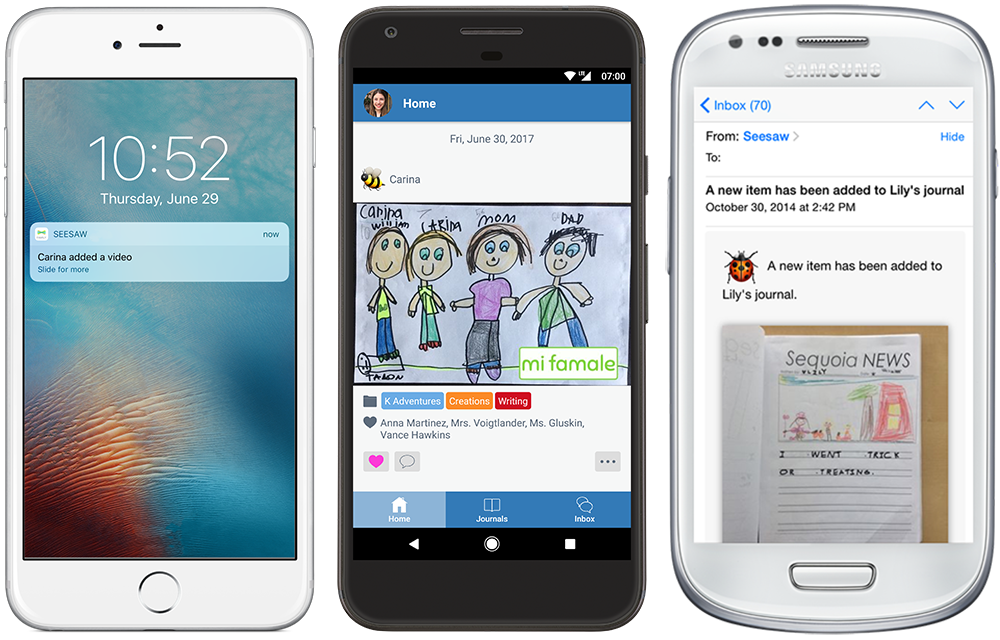
Seesaw is a learning journal ideal for all students. It is an organized digital record of my students' learning. I use it as a tool for collecting evidence of the learning that occurs in my classroom. Parents can be given access to their child's account, receiving notifications every time their child posts a new item.  


Why Use Seesaw?

Seesaw is the perfect way to:

  • document learning
  • empower students to reflect
  • teach digital citizenship and 21st-century skills
  • build an organized record of student work
  • create a community around learning
  • involve families in real-time
Reading Fluency

MLK Statement


Students can:
  • Use the photo and video function to:
    • explain
    • describe
    • read fluently
    • decode
    • label
    • defend an opinion and position
    • investigate or experiment 
    • demonstrate
Reading Fluency


  • Use the drawing function:
    • in place of paper/pencil
    • record while they draw to explain thinking.
    • sketch out a story idea
    • label something
    • show mathematical thinking
    • use "think marks" while reading
Mathematical thinking

Showing work using paper/pencil

Showing work using the draw tool


Families can:
  • view their child's work and leave comments and encouragement
  • use Seesaw as a way to communicate and be up to date on the learning their child is doing in school
  • read teachers' reports to help motivate their child to do better because they know their teachers will provide immediate feedback


Teachers can:

  • use Seesaw as a hub for students to share their work, and specifically encourage individual reflection and feedback
  • use Seesaw as a place not only where student work can be stored, but where teachers and peers can provide encouragement, constructive criticism, and suggestions for improvement
  • comment to provide feedback that is constructive
  • create formative and summative assessments
  • create or use premade assignments
  • send individual students differentiated assignments

Differentiated Assignment


Seesaw is an amazing digital tool to add to your tool belt! It has encouraged creativity for my students. It has given my students a place to display their work and showcase their successes during virtual learning. 


Positively Teaching,  
Randi Muehlen
Wednesday, April 18, 2018

Learn, Create, Share


Learn, Create, Share


As mentioned in my last blog the Seesaw app is a learning and communication tool. Not only does it enhance learning but it also boosts communication between teachers, students, and parents. Did you get the opportunity to create an account for your class?

“Can you say phenomenal?” - Online Teacher Review

Wouldn’t it be phenomenal if your students’ parents could have a daily glimpse of how their child is doing in math? What if I told you it's possible? Through this tool student’s are able to show their parents a glimpse of how they are doing in math on any given day.

We have recently introduced multiplication to 2nd graders. They love it! But imagine how much more engaged in math they could be when integrating technology!


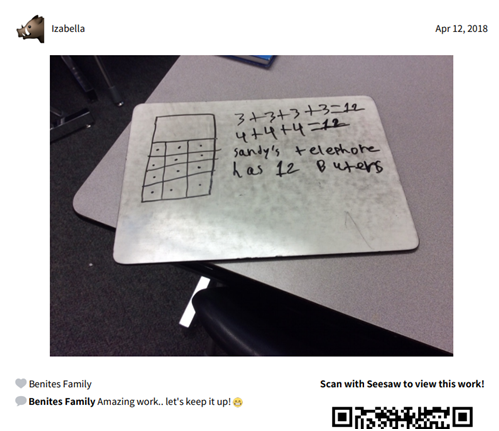
Last week there was a math lesson with an Application Problem that read:


Sandy's toy telephone has buttons arranged in 3 columns and 4 rows. 

a. Draw a picture of Sandy's telephone. 
b. Write a repeated addition equation to show the total number of buttons on Sandy's telephone. 
c. Answer the question in a written sentence. 

So how did I integrate Seesaw with this application problem? I added it to Seesaw as an “Activity.” After discussing the application problem students solved the problem on their whiteboards, took a picture of it, and uploaded it to their Seesaw account. Once uploaded, their parent gets an alert and they can see it on their phone! If you allow for it, they can even comment! Check out one student’s result:


As you can see, Izabella, solved this problem correctly. Her family was able to see her work and just a few minutes later comment on her work: “Amazing work. Let’s keep it up.” Students love to make their parents proud!

Watch what happens when students solve an answer incorrectly. This next problem was part of an application problem that required students to add up to 3 different addends.

Wow! This student’s parent quickly reminded her son to make sure to check his work. I find this to be quite powerful! Now they are accountable to show not just their teacher, but their parents too!
This tool can also be used as proof during conferences. Instead of going through a pile of papers, go straight to this students’ profile. There it is! A digital portfolio of work throughout the year.

“Parents love that they get a glimpse of a typical day in their child's classroom. I can also capture many items and observations for students' individual portfolios. Super easy to set up, share and use daily.” Online Teacher Review

Aren’t you excited to start using this tool? Check out the following tutorial on how to Create a Seesaw Activity . Now you can easily create and share activities for your students to complete in Seesaw. I’d love to hear what activities you come up with!

Inspiring Minds,
Melissa Hernandez


Most Viewed Posts