Showing posts with label Language Arts. Show all posts

Tuesday, October 26, 2021

Digging Deeper Into Learning Strategies: Close Reading for Exceptional Learners

 By Heather Pfrunder, M.A.Ed.   SDC Teacher and Education Specialist

October 25, 2021


The written word...oh how I love thee!  I could wax poetic for at least 5 pages on how much I LOVE reading, and even writing!  However, teaching this all encompassing and vital subject had me shaking in my boots as a new teacher.  There is just sooo much to cover.  In fact, my first several years of teaching I merely tested the waters of what I might explore versus really developing deeper strategies.  Upon my third school year teaching, and my first at OMSD, I really began to grow in this area.  However, implementing strategies which include writing to learn seemed daunting to students that barely acquired phonics skills and were challenged to learn vocabulary.   So I went down checklists: What do my students need to learn?  What is required that they have exposure and learn to use strategies comparable to their typical peers -- particularly AVID?  How do I select texts?  So hang tight - because this post has every resource I’ve ever created (and 2 I gathered) for ELA -- all downloadable!


What do my students need to learn? 


  1. A-typical/autistic students require visuals (i.e. pictures) to help them relate the written word to a concept.  This strategy is also helpful for students with cognitive delays or are Language Learners (that covers 100% of my students and probably a few of your students, too).

  2. Repetitive practice to understand the task demand so that they can focus on the actual learning/application of learning.

  3. Simplicity - while a concept can be complex to a degree, the format needs to be not too visually busy.


What Strategies Do I Need to Teach?


From a fundamental standpoint I need to address the following skills, as all reading comprehension rests on the following (and note - I usually teach them in this order):

  1. Wh- Questions

  2. Story Sequence

  3. Story Retelling

  4. Citing Text Evidence

  5. Identifying Themes

  6. Metacognition While Reading


Added to that are specific expectations of how learning should occur: AVID (i.e. column notes/WICOR, RACES, Thinking Maps, Costa’s Levels of Thinking), and of course, our district appointed curriculum: Wonders.


Starting with Wh- Questions, try using a mat to reference Wh- Mat Free Resource

Then break it down: Using a graphic organizer


This one I created. It has the blue shading because most of my students

are also challenged with their handwriting skills.


Story Sequence: For this one I typically start with taking pictures of the story.  Students can reference the book to match the order.  Notice the difference between the two sets of visuals: the one I used earlier in the year also includes the text for students to cite.  As they become more proficient, they are expected to find the words in the actual text:


Notice the Select Your Theme at the bottom? After a passage/story
review, they are given options to identify the type of story and the
change or significance of the story.
                                                                  

Story Telling: I created several versions of this graphic organizer, each version addressing Costa’s Levels of Thinking.  Below is the simple level one thinking.

Yup… I love the “Someone, Wanted, But, So, Then, Finally” format of story retelling.  You pretty much can’t go wrong with simple stories.  For added challenge, students really have to pay attention to time frames in a story if it starts with a “flash-forward.”


Citing Text Evidence:  Joint-attention is challenging enough when you are looking at a book and then worksheet to complete your work.  Add a graphic organizer on the wall to this, and well… who’s lost?  Everyone! Sigh… Solution?  Imbed the expectations right into the worksheet.  Make the worksheet a template and apply, and reapply… over time the concept is learned! Not only are we citing text evidence, but we are also reflecting on the Essential Question that is posed within the Wonders Curriculum.
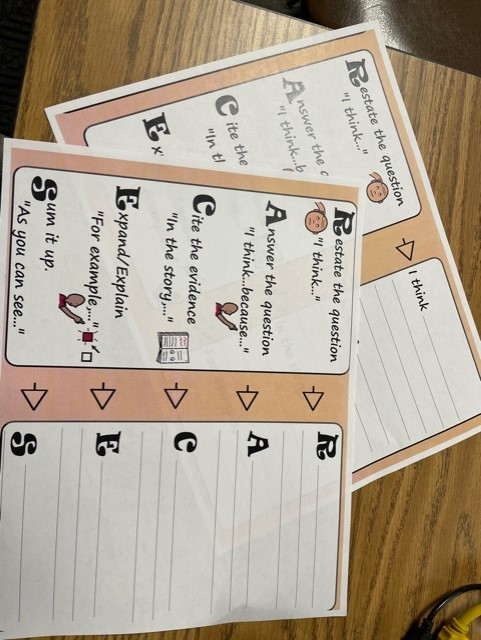


Note: there are two different versions of this RACE and RACES - 

Start with RACE for beginning learners.


Identifying Themes: This always has me near tears.  Abstract concepts are so hard for my students to connect with!  But then I realized that the solution could be as simple as basic story themes themselves!  Aren’t common themes recycled in most literature?  Especially simple literature?  I started with Thinking Maps about story problems/solutions, and then after this reflection, the Thinking Map for Story themes became a matter of visual connect-the-dots.
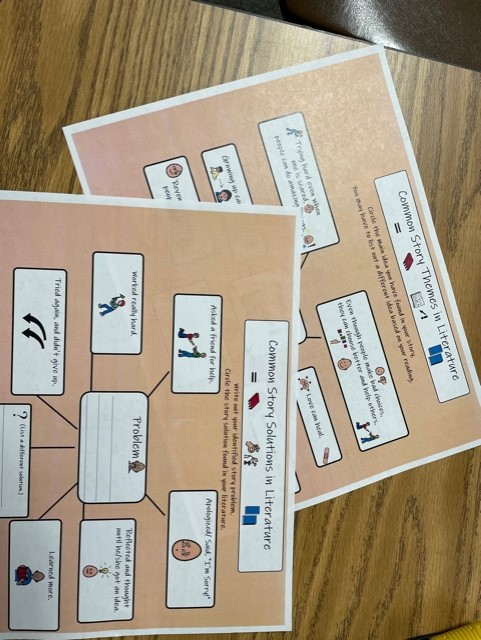

Story Problems and Story Themes are laid out into Thinking Maps. 

While Thinking Maps are meant to help students organize their own thoughts,

Modeling with them also has benefits.


Metacognition While Reading: While all of the previous graphic organizers can address metacognition with additional visuals and check in’s, there is one strategy that made an amazing difference for my more advanced learners, and that is the CSR Learning Model. Of note that the CSR model is not only a reflection of reading comprehension, but done correctly, it is also done in collaboration with a peer.  So think about Kagan strategies in conjunction with this.  CSR stands for: “The Collaborative Strategic Reading (CSR) strategy incorporates cooperative learning, vocabulary development, questioning techniques, opportunities to practice, and students’ use of prior knowledge” (Per: nysrti.org/intervention-tools/reading-tools/tool:csr/).

In its simplest of explanations, students reflect on what they “get” or the “GIST” of a passage/story and what they “don’t get” or the “CLUNK” of the passage/story.  Often, this boils down to vocabulary or word usage.  And for this I like to use the Frayer Model to do a deep dig dive on a per student vocabulary.  What I love about this is that vocabulary learning now becomes not based on teacher assigned work, but student identified need.  By the end of the process/last multiple read students really have looked deeply into what the passage says.  (Of note: while this works for all texts, I really like to begin with non-fiction texts of interest, especially those with more academic words.)
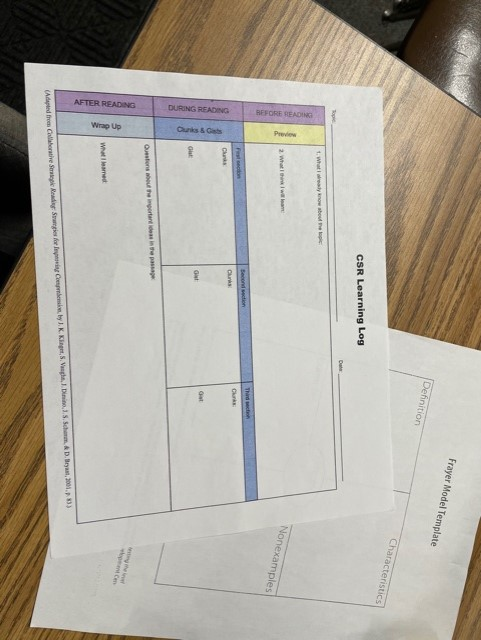

This is a simple graphic organizer with the before, during, and after reflections. 


For more on the CSR model you can explore: https://iris.peabody.vanderbilt.edu/module/csr/cresource/q1/p01/#content


Everything I have shared and More can be downloaded here:

Close Reading Strategies for Diverse Learners


So at this point I have shared a lot of resources and strategies.  Hopefully one or more will help you and your students on the very long road to English proficiency.  While all of these resources are created to exist in conjunction with the texts, often the question lies in which text to pick -- after all the provided resources of Mc-Graw Hill’s Wonders program can seem like an ocean when prep time demands that you select from a more pond-sized selection.


How Do I Select Texts?


For this I am suggesting that selection is either for UA/ELD support or if you are in an SDC setting like myself - you are adjusting based on IEP goals. So here goes the short version at the end of a long blog post!


  1. I actually like the Phonics Readers to begin teaching how to use strategies.  The simple text helps students focus on the main points.

  2. From there I go to the Anthology texts using the above shared graphic organizers.  I focus on main events and new vocabulary. I typically begin each story with a short video clip to introduce the topic and/or vocabulary slides.

  3. From there I go into using the Close Reading Companion (Grade 1-2) or Wonderworks (Grades 2- and beyond): story selections are vocabulary rich, with visuals, and tend to be slightly shorter than the Anthology.  I shift to this resource because the embedded questions on the page are much easier to navigate but are also complex enough to challenge and expand their understanding beyond the initial graphic organizers I have shared. Additionally, students can underline not only the work cited, but the key words in the questions being asked.


Over the years I have used supplemental resources (as found on teacherspayteachers.com) or programs like “Read Naturally,” but the idea is that students have access to high quality texts and are commensurate to their typically developing peers.  In this, adapting strategies to work in conjunction with the Wonders curriculum not only meets the unique needs of the students, but allows them access to the general education curriculum.


Like what you read?  Join me in upcoming blog posts where I continue to put these strategies into place and share resources!


Tuesday, January 19, 2021

Forever in the Middle: Reading Novels Virtually


Reading Novels During Distance Learning


I love reading great novels with students and that is the biggest thing I miss from having students in the classroom. It also wasn't something I was willing to give up during distance learning. In the Spring, my classes were about 2/3 of the way through The Giver when schools shut down, and this school year, my classes have read one novel and started a second last week. Figuring out how best to do this has been a continuous challenge so here is a little insight into what did and didn't work for me.

A Shift in Focus

I use novels to reinforce and practice ELA standards in the classroom.  Since we are so much more limited on instructional minutes this school year, I have had to remind myself that if the students don't understand every single detail of the texts, it's okay as long as they can apply what skills they practiced to new texts or make connections to new material. 

The focus is not on the book itself, it is on the standards while using the book as a resource. 


What does this look like in my online environment? My seventh-grade class is using their novel as a supplement to the current unit where we look at the differences in the way people live in other parts of the world. My intervention class is using their novel as a way of identifying narrative techniques and practicing literature analysis as well as responses to literature: areas that they need extra practice with. Earlier this year, we focused on similar standards with the 8th grade ELA classes as we read The Outsiders.

Asynchronous Reading With EdPuzzle

My eighth-grade students read The Outsiders in the Fall and I was happy to find the chapters available on EdPuzzle. The benefit of using this was that I could see exactly who was completing the reading and I also was able to have them answer questions along the way and received instant feedback on their learning.  The challenge was that the students who really enjoyed reading did not enjoy having to listen to someone else read and the students who were not self-motivated did not complete the reading at all. However, I did like the idea of using EdPuzzle and the feedback I received from it. In the end, it was not the best choice for me.


Synchronous Reading During Zoom

My students last year finished The Giver over Zoom. Since we didn't have a set Zoom schedule like this school year, I scheduled "Reading time with Mrs. Valverde" for anyone who wanted to read the book along with me. Attendance was not mandatory and I had a group of around 10 very dedicated students attend each day. They even asked to extend the time past finishing the book to read the next novel in the series. 

This semester, I started reading Forged by Fire with my 8th-grade intervention students and The Bridge Home with my seventh grade Language Arts class. I am reading about 10 minutes at the beginning of the period with each of the classes and using the chat in Zoom to receive feedback. This has worked fairly well. Also, both of the texts are on Actively Learn, which allows me to assign chapters to students to read and even include questions for them to answer at the end of each chapter: another way to check for understanding and keep the students accountable to reading. I can start the day's reading with them and have them finish it asynchronously after our Zoom class is over. 

Virtual Literature Circles

In the Fall, my 8th Honors ELA class read through The Outsiders at a much faster pace than the other groups. This allowed us to run digital literature circles with the students. I had a shared document where they were responsible for specific roles as they would have in a traditional classroom. They then signed up as a group to meet with me over Zoom twice during the four-week session. During this reading club meeting, they were given time to discuss the book with each other in real-time. 

My only role in this was to provide them with the time over Zoom and to listen in on their conversation. I could easily tell who was reading the book by the connections they were making and discussions they had during this time. This worked for 7 of my 9 groups. Two of the groups struggled with members who didn't pull their weight but overall, it was a positive experience. 

Don't let reading a novel with your students virtually intimidate you. I do miss actually feeling their reactions to things that happen in the books we read, but reading something together with a class is too magical for me to give up, even if I miss out on some pieces of it. It all comes down to what you find the most value in for your students. Whatever you choose to do with your students over the next few months, don't feel limited by online learning, but instead view it as an opportunity to do things differently. Who knows? Maybe you'll end up finding a strategy you love and can continue doing when we return to school.


Keep the magic alive, 


Kandyce Valverde

Wiltsey Middle School
7th/8th Language Arts

Monday, April 23, 2018

Slide This into the Classroom...Google Slides That Is! (Technology)


Slide This into the Classroom...Google Slides That Is!
The end of the year is fast approaching!  If you haven’t dived into the technology pool, now is the time!  One way to do it... Google Slides! I know this may seem so basic, and I know many of you are very familiar with it and use it, so why not let your students be as familiar with it as well as you are.   Give your students the opportunity to engage and create their own Slides presentation! Make it a research project, a year in reflection piece, or an all in one classroom piece that you can show at Open House.  The possibilities are endless!

Now that we are at the end of the school year do you need fun and engaging ideas to keep the education going?  

Well, Google Slides is just one of many ways to do it.  Google Slides offers many ways in which you can edit or create presentations.  You can give your students free reign and allow them to create their own from scratch or you can allow them to choose from preexisting templates that Google has already created for us.  .  Click here to see how to access those.  Or you can assign Slides of your specific liking for each student to have for themselves (assign it in Google Classroom).


Ways to use Slides in the classroom...


For the past two years, I have required my students to create a “digital memory book” about their 3rd-grade year in review.  Here they discuss favorite memories, subjects, greatest accomplishments, and subjects they have learned, just to name a few. These presentations are then put on display and running during Open House. Parents love to see this and always want to have a copy of memories.   For the less advanced kiddos you can create a template for them to just type right into with their answers, and for the more advanced have students create it all on their own. Want to bump it up, even more, have students collaborate on one of the slides and type in questions or comments they have for that student to respond to.

Another great way to use Slides is by requiring an end-of-the-year research presentation on anything that excites them.  It could be something they are interested in or want to know more about. This gives them the freedom to choose, take ownership, and really dive deeper into their learning.  

Depending on your grade and students you can make using Slides as basic (substitution/augmentation) or high (modification/Redefinition- SAMR model) as you want to go.  Use it for any subject or any topic you find beneficial. Here I have linked a couple of examples of how I have used it with my 3rd-grade students. Writing example one, writing example two, research example one, research example two.

Slides are something that our students should eventually know well.  It guides them on the road to career and college readiness as current students across the globe in high school and beyond are using this tool.  So let’s start now!


                       Tech-ing with a purpose,  
Tiffani Bossieux


T.Bossieux.jpg

Friday, February 23, 2018

Doceri and iPads (Technology)


Don’t be tethered to your computer all day! Use Doceri!


Do you often feel stuck to your little desk sitting next to your SMART Board?  Do you get frustrated when you need to use the document camera, but notice the kids in the back messing around or not as focused as you like?  Do you wish you can show your students what they need to see without always having to be right at the front?  Well, try Doceri- The interactive whiteboard for your teacher iPad!


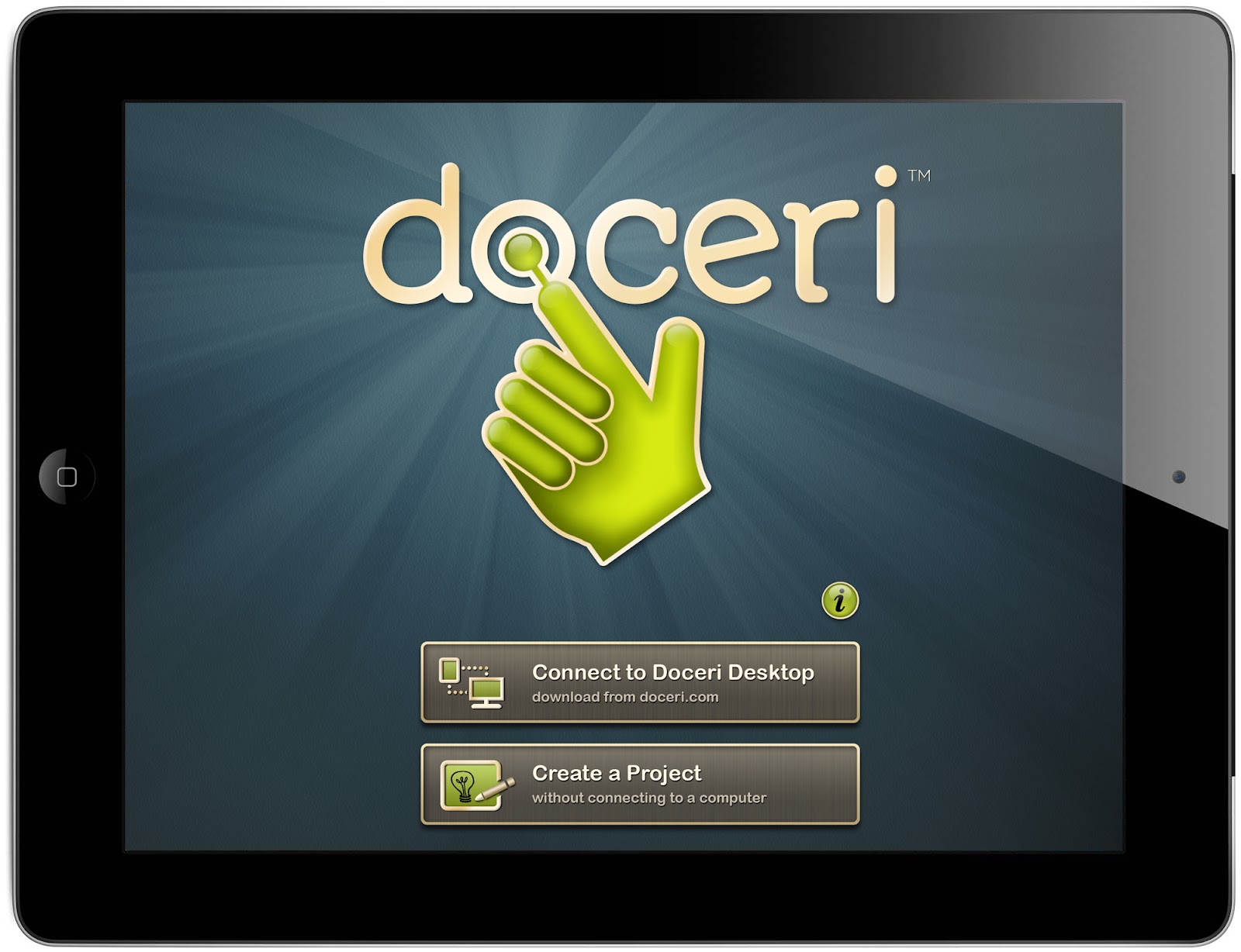
Doceri “gives you the freedom to teach.”


There have been so many days especially related to Eureka math when I wanted to show students how to work something out, but I had to be glued to the document camera or SMART board..it would drive me crazy.  Then I decided to play with the apps that are available on our iPads and discovered Doceri.  It allows you to take a picture of the document you want and then write directly on it!  If you project your iPad using “Reflector” which is on our computers, then everything can be seen on the SMART Board without actually having to stand at the Whiteboard.  Doceri has become a significant game changer when I want to navigate the room while working.    
See Doceri in action...https://youtu.be/GCyZXw3v4F4

Use Doceri with any subject

Anytime you want show and write on a document for students to see on the SMART board, just take a picture of it within the app and then use the “pen tools” to write directly on it.  This app is even great if you want your students to show their work to the class.  This app offers a lot of options for you to use and learn, but I just use it for writing and displaying.  I also love it because it keeps my students more on track knowing I’m not always stuck in the front.  No matter your tech ability you can use this app smoothly and seamlessly.  If you try it out, please let me know!  If you have questions about how to access this app or Reflector let me know!  I can refer you to the right people.
T.Bossieux.jpg
Tech-ing with a purpose,  
Tiffani Bossieux

Friday, January 26, 2018

Leveled Readers Online (Technology)

Maximize Wonders ConnectED
and Leveled Readers


As the year has gone by and I have had wonderful visitors come into my room to observe Universal Access, a question that keeps coming up is, “How do your students access their appropriate leveled reader online?” This post is to show just how to do it!


Not enough leveled readers in your library?  Well, why not assign it digitally and then ALL of your students can have access.

We all know how important, critical, and crucial reading is at all grade levels and ages.  It is also vital that students are reading texts that are most appropriate to help build their skills.  Wonders Online provides four different leveled readers for students to access.  The Lexile range is based on, “Approaching Grade Level, On Grade Level, Beyond Grade Level, and English Language Learner.” You can find exact Lexile levels for each book on the back or by clicking “details” next to the book online in your “Resource Library.” It is these levels that some teachers may not realize you can specifically assign to your students so that they can individually get what they need.  Click this link (directions) to follow the steps on how.

“The more that you read, the more things you will know.  The more that you learn, the more places you’ll go.” --Dr. Seuss

What can you do with leveled readers in the classroom?

T.Bossieux.jpgOnce you have assigned the leveled reader to your students, they can then hear a complete audio version of it (great for intervention).  Students can type in and answer all the comprehension questions directly into the book, and the great thing is, you can see their answers on your end under the “Binder” drop-down.  Click here to see directions on how to do that.  I use my leveled readers during my Universal Access time the most.  Allowing my students to access these online has been a game changer!  You can also use them as supplemental text during your week, literature circles, text for students to take home and read, or just extra text for your fast readers.   The possibilities are endless.  I hope this helps and if you have any questions, please let me know below!  Happy reading!

Tech-ing with a purpose,  
Tiffani Bossieux

Friday, October 20, 2017

Kahoot!...IT! (Technology)

Kahoot!...IT!


“Miss Bossieux, my test is giving me more than one answer to choose from, and I’m not sure which one to pick!” That was when I realized I had spent zero time offering multiple choice test options for my students.  We as teachers may now be deferring away from multiple choice so much that students can get thrown off or “tricked” by seeing multiple answers that they start doubting themselves. Yes, multiple choice isn’t as frequently tested as many test questions are now open-ended, manipulative, or ask for missing parts.  But that may also now mean, we are neglecting our students the opportunity to practice this form of testing before a formal test actually approaches.  Just like anything else we need to give this method of testing some attention. Continue reading and learn how you can do a quick FUN formative multiple choice assessment with the convenience of just one click.  


Technology and engagement go hand in hand, so let's use this to test our students in an exciting way and with any subject!

Testing is always a time for stress, success, anxiety, happiness, disappointment, or excitement just to name a few.  Not only do our students feel these things, but so do us as teachers.  We see those scores and either jump for joy or want to binge on two dozen donuts.  Well instead of ONLY focusing on just those formal, time-consuming tests that are required, why not take some pressure off and ALSO present assessments to our students that make them WANT to take them.  How do you do that you ask? Well try Kahoot.com!

Watch students and adults around the world use Kahoot


Create or “search” Kahoot assessments for your classroom.


Watch this great two-minute how-to video on the gist of Kahoot.  You can also explore the actual website (which I highly recommend)  or YouTube search “Kahoot” to find many informative videos.  

Once you familiarize yourself, the easiest and quickest way to implement this in your classroom is to “Find Kahoots.”  For example, in Wonders this week, I have been teaching my students, plural nouns.  I searched those keywords and boom! just like that I had a list of quizzes that teachers had created and shared.  I played that for my class and had 100% engagement and excitement through the roof.  You can even download the results to keep for data.  I have also used Kahoot for testing multiplication facts.

Kahoot is currently living on our students’ Symbaloo homepage, so all they need to do is click the link. You can also use it on your district iPads, by accessing it through your Chrome browser. Use Kahoot whole class, small groups, or in the computer lab. Kahoot is also offered and can be played in teams if students need to share devices.  

Give it a try! Make up your own multiple choice quiz, discussion, or survey! And if you try it, please let me know how it went!  I would love to hear all about it!


The techy teacher,
Tiffani Bossieux


T.Bossieux.jpg

Friday, September 22, 2017

Questioning + Google Classroom = One Good Idea


Questioning + Google Classroom = One Good Idea
“Class, who was the main character in this story?” “Class, can you identify the character’s problem?” “Class, why does Gary like recess?”...  Does asking questions like these from our TEs sound like you?  Are the teachers doing all the asking and our students doing all the answering?  

Well keep on reading and learn how to mix it up and turn the “asking AND answering” over to our students.  

Google-Classroom-Free-Learning-Management-System.jpg

Want to provide an engaging way to get students to ask and answer questions?
Google Classroom is the way to do it!
Students can ask and answer questions from their peers with instant real-time replies.

Asking and answering questions can be dry, difficult to do, and not always engaging.  As we know comprehension is very important for student understanding and growth.  We consistently need to provide opportunities for students to improve their thinking and responding skills.  

“The marvelous thing about a good question is that it shapes our identity as much by the asking as it does by the answering.” – David Whyte

Create an ‘asking and answering’ assignment using Google Classroom.


After you and your class read your text, tell students to think of a question they can ask in order to “test” their classmates.  They have to know the answer to that question so that they can go back and correct their peer’s response.  Have students type their question into the “Google Classroom assignment” (video tutorial here).

Once all students have typed in their question, assign students to a partner so they know whose question they should respond to.  

Just like that you have turned an asking and answering comprehension strategy from McGraw-Hill Wonders into an online assignment that can now be shared and commented on through the use of Google Classroom.    

How can you differentiate?… Provide students with question stems.  Require different levels of questions.  Require some students to type more than one question.  Partner up like-students when responding.  Not 1 to 1 with computers?  Do this assignment in shifts; while half the students are entering their questions the other half can work on other assignments, and then switch.  Complete this activity in small groups.  Provide this assignment for your ‘challenge’ group.  

Here is a link to see an example of two third grade students’ asking and answering.….Now, happy questioning! :)


                            Tech-ing with a purpose,  
Tiffani Bossieux


T.Bossieux.jpg

Most Viewed Posts